Help › Getting started
Recording a flight: every field explained
Add or edit a flight, and know exactly what each field means: Out, Off, On and In, block and flight time, PIC and SIC, night, cross-country, instrument, approaches and landings, under the FAA's rules and in LogAloft's math.
Most of your flights will come in from a roster or a logbook file, but sooner or later you'll open one to fix a time, add a landing or log a sim session by hand. This guide goes through the flight form tab by tab: what each field is for, what the FAA's definitions say about it, and what LogAloft fills in or works out for you when you leave it empty. Regulations here are US (14 CFR); if you fly under another authority, the fields are the same but the rules behind some of them differ.
LogAloft is a record-keeping aid. What you may log, and how, is set by your authority's rules and your company's procedures, and those come first. When in doubt about a particular entry, ask your training department or a CFI, and keep the documents that back it up.
Add a flight
The form has tabs across the top: Flight, Times, Landings, Crew, Notes, Track and Dose. A tab with nothing to show for this flight is left out (a deadhead has no Times or Landings, for example). Save and More stay at the bottom whichever tab you're on.
| Tab | What's on it |
|---|---|
| Flight | Times in UTC or local, date, flight number and Look up, ACARS (photo), From and To, Out, Off, On and In (and the optional scheduled, taxi, Hobbs and tach times), On board as, Seat, and the optional Operation and Training device |
| Times | The logbook times: Total, PIC, SIC, night, instrument, cross-country, relief and the optional ones, and I was pilot flying |
| Landings | Day and night takeoffs and landings, holds, approaches and the optional all landings and autolands |
| Crew | Training (instructor, flight review, IPC, checkride) when shown, the crew list, and the aircraft's tail and type |
| Notes | Route and cruise levels, remarks, photos and files, your own fields, and Choose fields… |
| Track | The GPS track, when the flight has one |
| Dose | The flight's cosmic radiation dose and where it's worked out from |
- Tap Add flight (on a phone, the + tab). The form opens on the Flight tab.
- Choose Times in UTC or Local. The labels change to match ("Date (UTC)", "Out (UTC)"). Local means the local time at each airport: Out in the departure airport's time, In in the arrival's.
- Type the Date and Flight number (ZZ412) and tap Look up. LogAloft fills the airports, the aircraft type, and for a flight that has flown, the real gate times and the tail.
- Check From, To and the times. Type Out, Off, On and In as 24-hour HH:MM (1305 or 13:05).
- Set On board as and Seat, further down the same tab. Then, if you want, open Times, Landings and Crew for the logbook times, landings and crew. Leave them empty if you like: LogAloft fills the total and your seat's time from Out and In.
- Tap Save.
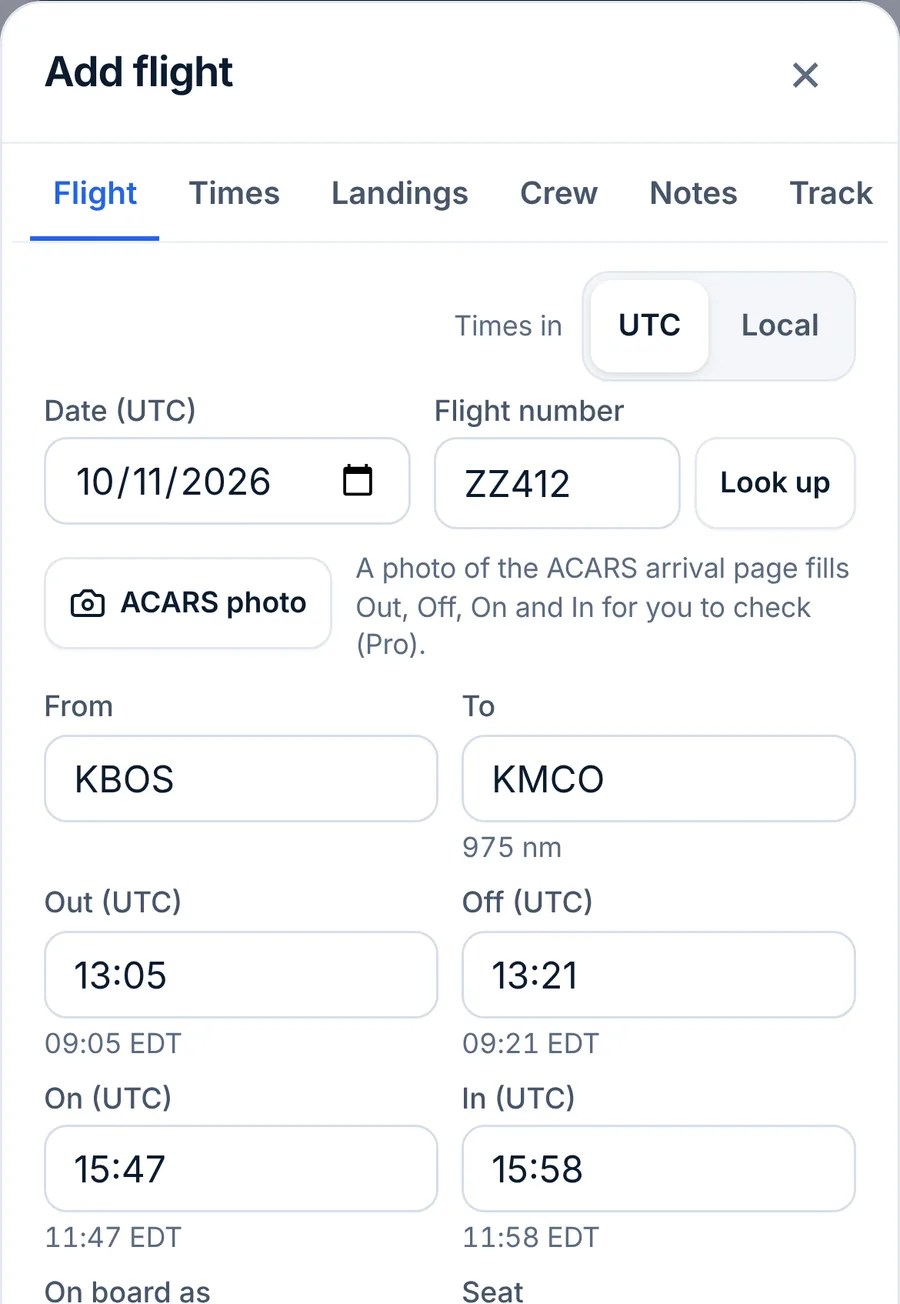
Faster ways for the next one: in the form, More → Next leg starts a flight from where this one landed, Return trip reverses it, and Duplicate copies it. Signed in with Pro, ACARS photo under the flight number reads the four times from a picture of the ACARS arrival page Pro.
When the flight's record has no gate times, Look up fills Out and In with the takeoff and landing times. Correct them to your block times, or your total comes out short by the taxi.
Editing, deleting and history
Tap any flight to open it. Change what you need and tap Save. Delete removes it at once and shows Undo for a few seconds. What you type is never overwritten by a later import, and every earlier version of a flight is kept in its history: More → History lists them and can restore one. More → Lock protects an entry from changes; a flight signed by an instructor is locked by itself.
Out, Off, On and In
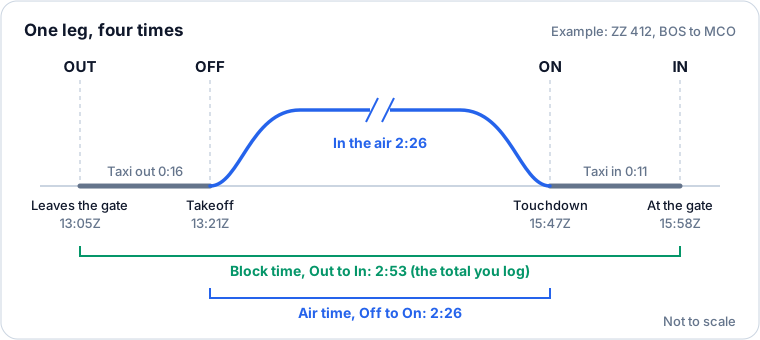
Four times describe every leg, the "OOOI" times your aircraft's ACARS reports:
| Time | When | Also called |
|---|---|---|
| Out | The aircraft leaves the gate | Block out, off blocks, brake release |
| Off | Wheels leave the runway | Takeoff, airborne |
| On | Wheels touch the runway | Landing, touchdown |
| In | The aircraft stops at the gate | Block in, on blocks |
Block time and flight time
14 CFR 1.1 defines flight time as "pilot time that commences when an aircraft moves under its own power for the purpose of flight and ends when the aircraft comes to rest after landing." For an airplane, that's the taxi out, the flight and the taxi in: in airline terms, block time, Out to In. It's the number that goes in your logbook's total column, and the one FAR 117's flight time limits count.
Air time (Off to On) is shorter. Some operators and some authorities' forms ask for it too, so the form keeps Off and On.
How LogAloft uses them:
- Total is worked out from Out and In when you leave it empty. In Settings → Total time on a new flight from, you can choose Off to On (air time), when both are entered instead. Type a total yourself and it's kept as you typed it.
- Times follow one another. In earlier than Out rolls to the next day (a night flight). But a time a little earlier than the one before it is treated as a typo, not the next day: the form says "In (…) is before On (…): each time comes after the one before it, Out, Off, On, In." A flight longer than 20 hours is refused for the same reason.
- Change Out or In later and the total follows, and so do PIC or SIC when they held the whole total.
- Times you type are never replaced by the flown times LogAloft fetches after landing.
Your company's definition of Out (brake release, first movement, door closed) is the one to use. LogAloft only does the subtraction.
Optional time fields
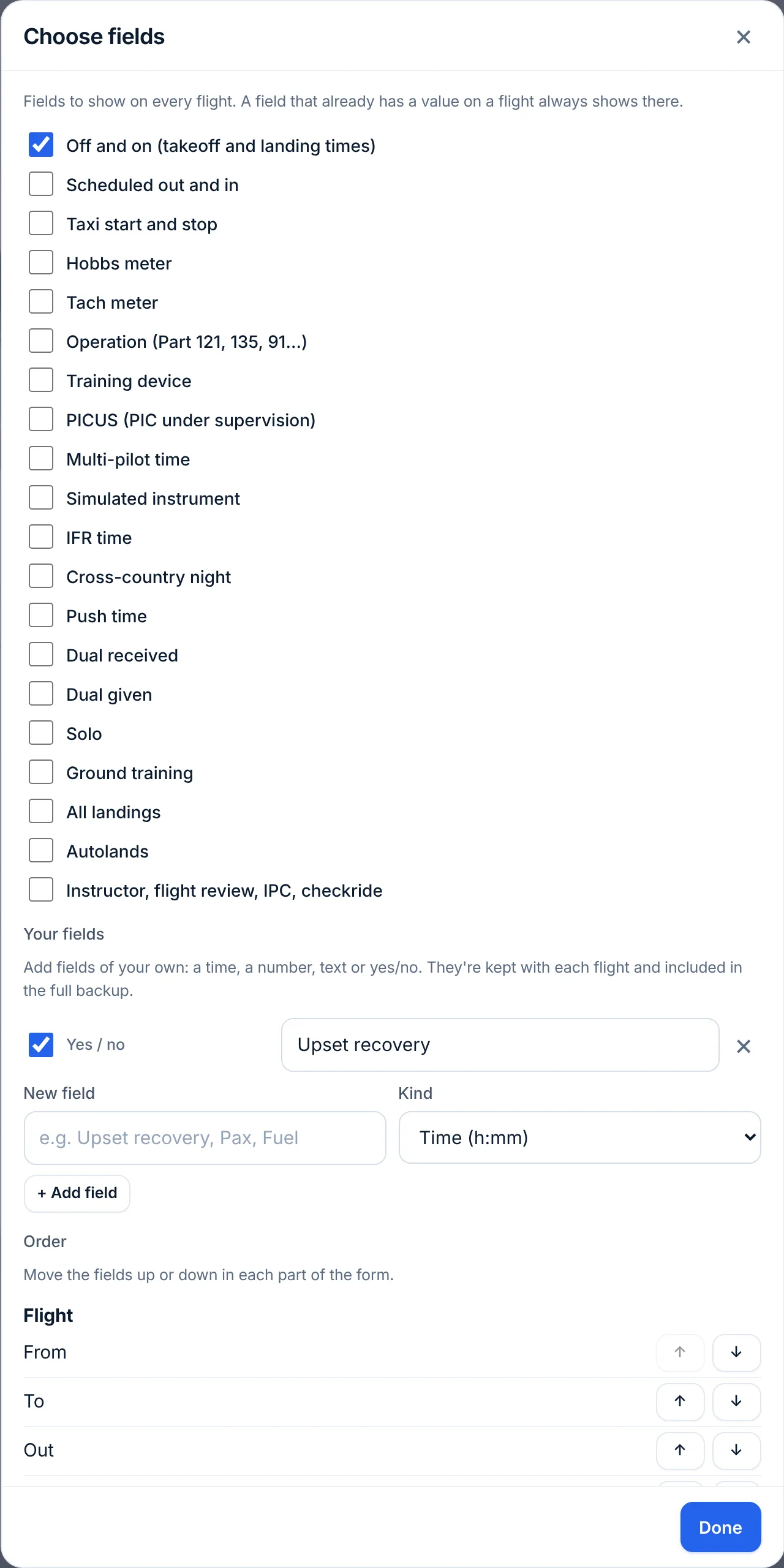
Choose fields… at the bottom of the Notes tab (or More → Choose fields) adds fields you need and hides the ones you don't. Among them: Scheduled out and in, Taxi start and stop, Hobbs meter and Tach meter (a Hobbs pair gives the total when it's left empty), and Operation (Part 121, 135, 91K, 91, 129). A field that already has a value on a flight always shows on that flight. You can also add fields of your own: a time, a number, text, yes/no or a date.
Who you were on board
On board as, on the Flight tab, decides whether the leg is flight time at all:
- Operating crew: you were a required crewmember. The logbook times count.
- Deadhead and Passenger: not flight time. The logbook times are cleared; the leg counts only for your radiation dose (and a deadhead also as duty for your rest limits).
- Simulator: a session in a training device. Its total is logged as simulator time, never flight time. Set Training device (full flight simulator, FTD, AATD or BATD) if you've added that field.
Seat is PIC (captain), SIC (first officer), relief pilot or flight attendant. With PIC and SIC left empty, the total goes to the one that matches your seat.
The logbook times
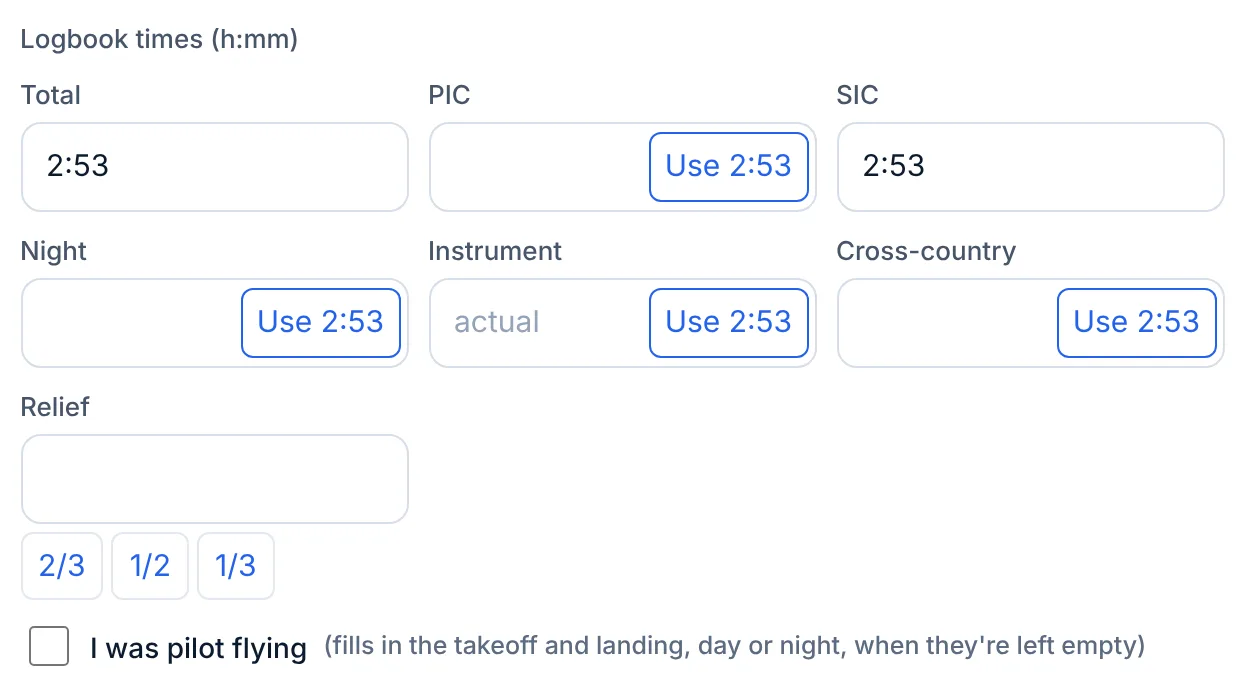
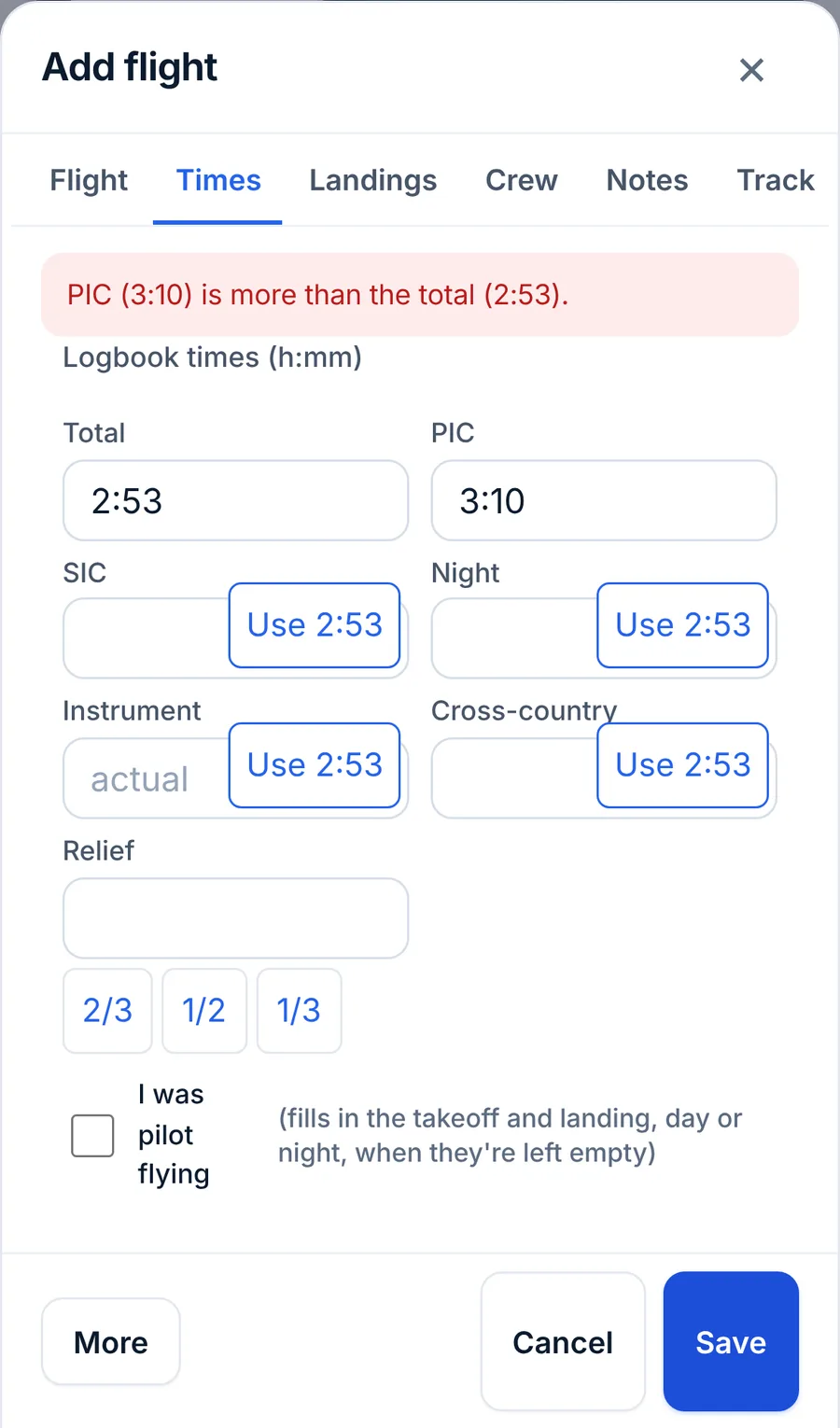
The logbook times are on the Times tab. Every time field takes h:mm (2:53) or decimal hours (2.88). When a total is known, each empty field shows a Use 2:53 button that fills it with the total. No part can be longer than the total: the form names the field ("PIC (3:10) is more than the total (2:53).") at the top of the form when you tap Save.
PIC and SIC
The two are defined in 14 CFR 1.1, and when you may log them in 14 CFR 61.51:
- Pilot in command (1.1) is the person who has final authority and responsibility for the flight, was designated PIC, and holds the category, class and type rating for it. Logging PIC time (61.51(e)) is broader: you may log it as sole manipulator of the controls of an aircraft you're rated for, as sole occupant, or while acting as PIC of an aircraft or operation that requires more than one pilot. An ATP may log all flight time while acting as PIC of an operation that requires an ATP certificate.
- Second in command (1.1) is a pilot designated SIC during flight time. You may log SIC time (61.51(f)) only while qualified under 61.55 and occupying a crewmember station in an aircraft that requires more than one pilot, by its type certificate or the rules the flight is conducted under.
A captain and a first officer each log the whole block in their column. Swap PIC and SIC (on the Crew tab) swaps the crew, your seat and the two times when you entered them the wrong way round.
PICUS, multi-pilot and relief
- PICUS: performing the duties of PIC under the supervision of a qualified PIC. In the US, 61.51(e)(1)(iv) allows logging it as PIC time only in an approved PIC training program, with the supervising PIC certifying it in your logbook. EASA and Latin American logbooks keep PICUS as its own column, so the field shows by default when your license is EASA, UK, Colombian or ICAO.
- Multi-pilot: time in multi-pilot operations, a column EASA logbooks keep and the EASA ATPL counts.
- Relief: time as a cruise relief pilot on an augmented crew. The 2/3, 1/2 and 1/3 buttons fill it as a share of the total. Whether relief time is PIC, SIC or neither depends on your authority and what you did. LogAloft keeps it in its own column, and Settings → Take relief time off PIC or SIC when they're filled in for me subtracts it ("time in the bunk isn't time at the controls").
Training: dual received, dual given, solo, ground
These are on the Times tab (the instructor and the flight review, IPC and checkride boxes on the Crew tab). They show by default when you tick I also fly general aviation or train in Settings, or add them with Choose fields.
- Dual received: flight training from an authorized instructor (61.51(h)). The entry needs the instructor's endorsement: a description of the training, its length, and their signature, certificate number and certificate expiration date or recent experience end date. Fill Instructor and Instructor certificate, then More → Sign flight to have them sign on your screen or on their own phone.
- Dual given: instruction you gave as an instructor.
- Solo: only flight time when you were the sole occupant of the aircraft (61.51(d)).
- Ground training: training on the ground from an authorized instructor.
- Flight review (61.56), Instrument proficiency check and Checkride: tick the one this flight was. A flight review is at least 1 hour of flight training and 1 hour of ground training, and you need one within the 24 calendar months before you act as PIC, unless a checkride or proficiency check took its place (61.56). LogAloft dates your next one from the tick.
Night time
The rule
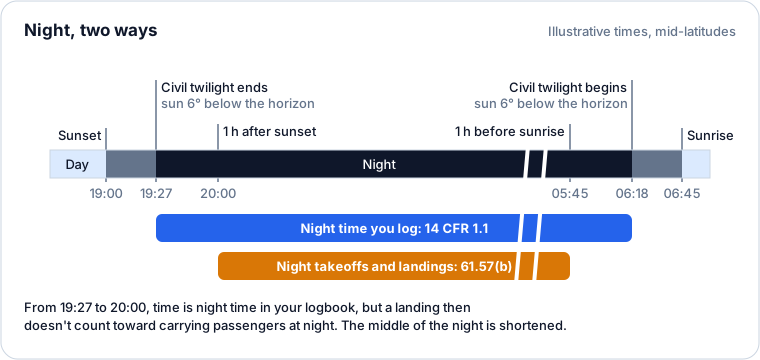
14 CFR 1.1: "Night means the time between the end of evening civil twilight and the beginning of morning civil twilight, as published in the Air Almanac, converted to local time." Civil twilight ends in the evening, and begins in the morning, when the center of the Sun is 6° below the horizon (U.S. Naval Observatory). At mid-latitudes that's roughly 25 to 35 minutes after sunset and before sunrise; it's longer at high latitudes and shorter near the equator.
Passenger-carrying currency uses a different window. Under 61.57(b), to act as PIC of an aircraft carrying persons from 1 hour after sunset to 1 hour before sunrise, you need three takeoffs and three landings to a full stop in that same window within the preceding 90 days, as sole manipulator of the controls, in the same category, class and type.
What LogAloft works out
Leave Night empty on an operating leg with both airports and Out and In, and LogAloft works it out when you save:
- It follows the great circle between the two airports, from Out to In, in 2-minute steps, and at each step finds the Sun's elevation at the aircraft's position at that moment.
- Every step with the Sun more than 6° below the horizon is night. The sum, never more than the total, goes in Night.
- With I was pilot flying ticked and the takeoff and landing fields empty, it also logs one takeoff and one landing, each as day or night. A takeoff or landing is night when the Sun is below the horizon from 1 hour before to 1 hour after it, which is the 61.57(b) window. It uses your Out time at the departure airport and your In time at the arrival airport.
- Night typed by you is kept as you typed it. Reports note how much of your night total was worked out rather than typed.
Its limits, so you know when to type night yourself:
- It assumes the great-circle route. A long deviation, a hold or a diversion can change the dark stretch.
- The Sun's elevation is computed for the surface below the aircraft. At cruise altitude the horizon is lower, so the Sun sets a few minutes later for you than for the ground beneath.
- Near the twilight and 1-hour boundaries, a few minutes decide the answer. If a landing was close to the line, check it against the Air Almanac or a sunrise and sunset table for that airport.
Cross-country
The rule has several versions
14 CFR 61.1 defines cross-country time differently depending on what you use it for:
| For | Cross-country time is a flight… |
|---|---|
| General use (61.1(i)) | that includes a landing at a point other than the point of departure, navigating to it by dead reckoning, pilotage or navigation aids. Any distance. |
| Private, commercial and instrument rating experience (61.1(ii)) | that includes a landing at a point more than 50 NM in a straight line from the original point of departure. |
| ATP experience, airplane (61.1(vi)) | that is at least a straight-line distance of more than 50 NM from the original point of departure. No landing elsewhere is required. |
| Sport pilot (61.1(iii)), rotorcraft (61.1(v)) | as above with 25 NM; powered parachute (61.1(iv)), 15 NM. |
The ATP version matters for airline applicants: a flight that goes more than 50 NM from the airport and comes back to it without landing elsewhere counts toward the 500 hours of cross-country an ATP certificate needs (61.159(a)(1)), but not toward a commercial certificate.
What LogAloft does
- Whatever you type in Cross-country is used as is.
- Left empty on an operating leg, reports count the whole total as cross-country when the departure and arrival airports are more than 50 NM apart in a straight line, and none when they're closer or the same. The field itself stays empty; the rule is applied when totals are added up, and the CSV and LogTen exports write the value it gives.
- That means a local flight that went more than 50 NM out and came back (ATP cross-country) counts as zero until you type it, and a 30 NM hop to another field (cross-country under 61.1(i), but not for ratings) counts as zero too. Type those yourself.
- Cross-country night is an optional field for logbooks that keep it apart.
Instrument time
- Instrument is actual instrument time. Under 61.51(g)(1), you may log instrument time only when you operate the aircraft solely by reference to instruments, under actual or simulated instrument conditions. Whether time in cloud on the autopilot, or as pilot monitoring, counts is a common question: follow your operator's practice and your authority's guidance.
- Simulated instrument is time under a view-limiting device, or in a simulator or training device. Log the safety pilot's name for simulated time in flight (61.51(b)(1)(v) and (g)(3)(ii)): add them on the Crew tab with the role Safety pilot, and the flight shows "Safety pilot: name". A ForeFlight import brings its safety pilot in with that role.
- IFR is an optional field for the time flown under instrument flight rules, which some authorities' logbooks ask for. It isn't the same as instrument time and isn't counted as such.
Reports → Progress counts actual and simulated instrument together toward a rating (for example the ATP's 75 hours, 61.159(a)(4)). The rules cap how much of that may come from a simulator or training device; check those limits yourself.
Approaches and holds
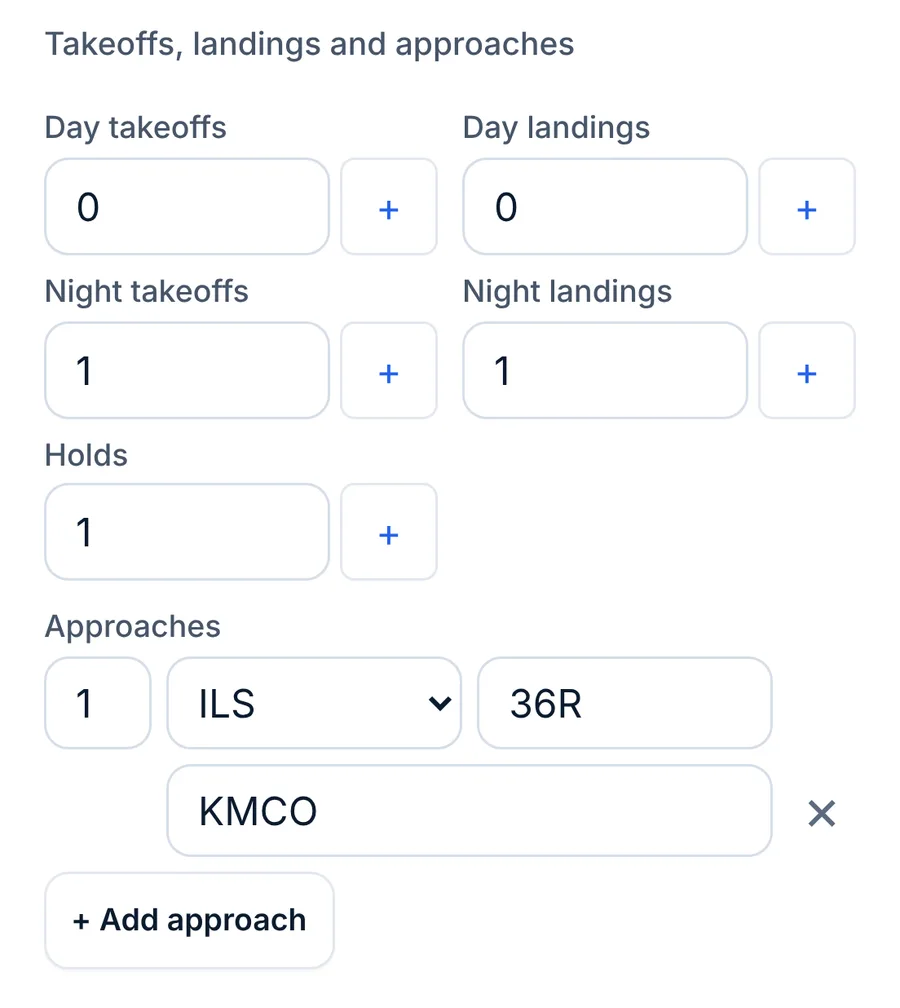
On the Landings tab, tap + Add approach for each approach or group of approaches: the count, the type (ILS, LOC, RNAV (GPS), LPV, RNP, RNP AR, VOR, NDB, GLS, LDA, SDF, PAR, ASR, Circling, Visual or Other), the runway and the airport (it starts as your arrival airport).
To use them for instrument currency, 61.51(g)(3) requires the location and type of each instrument approach in your logbook. That's why each row has both.
Instrument currency (61.57(c)) needs, within the 6 calendar months before the month of the flight, six instrument approaches, holding procedures and tasks, and intercepting and tracking courses through navigation systems, in actual or simulated conditions, in the aircraft category or a device that represents it. LogAloft counts your instrument approaches (visual approaches are left out) and your Holds, and shows the result in Reports → Currency. Course intercepting and tracking isn't a field; it's assumed when you fly the approaches.
Takeoffs and landings
These are on the Landings tab too.
- Day takeoffs, Day landings, Night takeoffs, Night landings: the + button adds one. Count only the ones you made as sole manipulator of the controls, which is what currency requires.
- Log full-stop landings here. Night landings for 61.57(b) must be to a full stop, and LogAloft's currency check counts this field as full-stop landings. Exports label them that way too.
- All landings (optional) holds every landing, touch-and-goes included, for training flights.
- Autolands (optional) for the airlines and authorities that track them.
Day currency (61.57(a)): three takeoffs and three landings within the preceding 90 days, as sole manipulator, in the same category, class and type (if a type rating is required), to act as PIC of an aircraft carrying persons or one certificated for more than one pilot. In a tailwheel airplane they must be to a full stop. Training centers under Part 142 can credit an approved simulator.
If you were pilot flying, tick I was pilot flying on the Times tab and leave the four counts empty: LogAloft logs the takeoff and the landing and decides day or night for each. If you did two circuits, type the counts instead.
Crew and aircraft
Both are on the Crew tab.
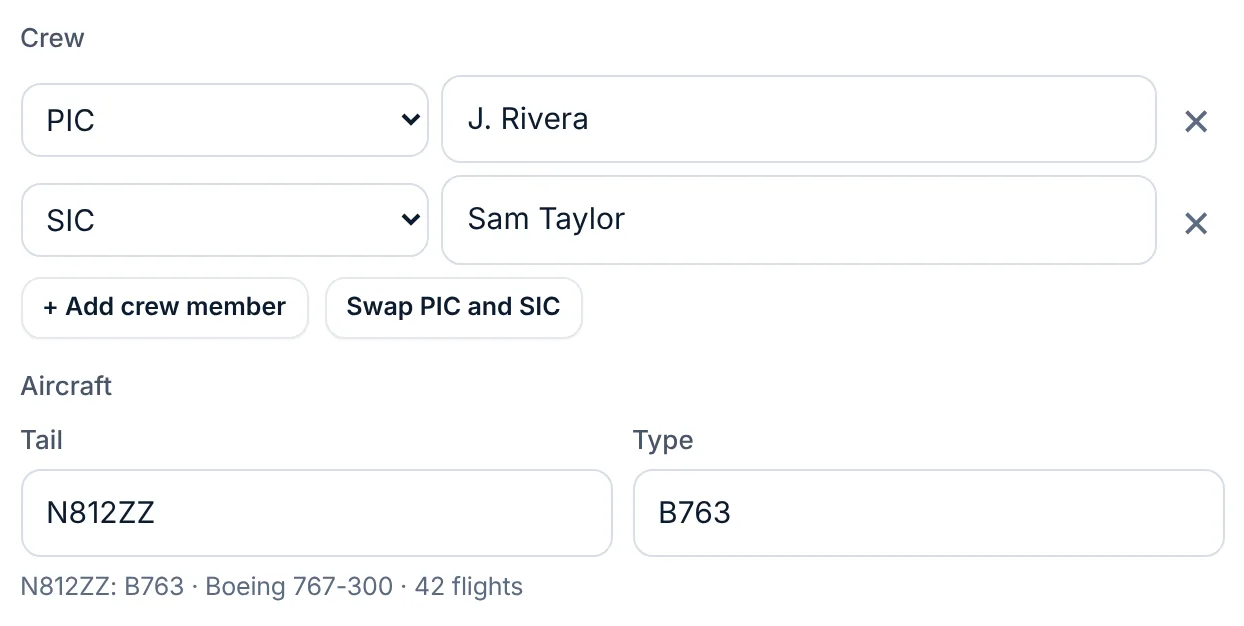
- Crew: + Add crew member adds a row with a role (PIC, SIC, Relief, Flight attendant, Instructor, Student, Examiner, Observer or Crew) and a name. Names you've used before are suggested. Crew members you set as the default in Crew & aircraft start every new flight. Mark yourself with "This is me" there, and a flight with you in its crew gets your seat from your role.
- Aircraft: Tail and Type (the ICAO type designator, such as B763 or A332). A tail you've flown before brings its type, and the line under the fields says how many flights you have in it. A new tail is saved with its type for next time.
Notes, track and dose
- On the Notes tab, Route and cruise levels (optional): paste the route from your release and the levels with step climbs (FL350, FL370 at 30W). They sharpen the dose, especially on an ocean crossing where the flown track has gaps.
- Remarks: free text, kept with the flight and printed on logbook pages.
- Photos and files: up to six per flight, kept on your device and, signed in, in your account.
- Track (its own tab): a GPS track file for the debrief, when you've imported one.
- Dose tab, Cosmic radiation: the flight's dose, Get dose (Update dose once it has one), and Work out the dose from to choose the flown track, your route and levels, or an estimate. Your airline's figure for this flight lets you compare with the number your airline reports. See the method page.
When Save says no
When something is wrong, the reason shows in red at the top of the form, under the tabs, whichever tab is open. Open the tab with the field it names (the logbook times are on Times) and fix it there.
| Message | What to do |
|---|---|
| Add a flight number, or both airports. | A flight needs one or the other (a simulator session needs neither). |
| Unknown airport XXXX. | Check the code. For a small airfield, tap Add XXXX as an airport. |
| Out time: use 24-hour HH:MM. | 0705 or 07:05, not 7:05 am. |
| In (…) is before On (…) | A typo in one of the four times. |
| In is before Out, or the flight is over 20 hours. | Usually a wrong date or a.m./p.m. mix-up. |
| PIC (…) is more than the total (…). | A part can't be longer than the whole: often 8 typed for 0.8. |
| Your free logbook is full | Free accounts hold 25 flights or 50 hours. See Your first ten minutes. |
Common questions
Should I log block time or air time as my total?
For airplanes, flight time under 14 CFR 1.1 runs from when the aircraft moves under its own power for the purpose of flight to when it comes to rest after landing, which is block time. That's LogAloft's default. Choose air time only if your authority or operator tells you to.
Why is there night time on a flight I didn't type any for?
You left Night empty, so LogAloft worked it out from the times and airports. Type your own value, even 0:00, and it's kept.
My landing was 45 minutes after sunset. Is it a night landing?
For your logbook's night time, yes: it was after the end of civil twilight. For 61.57(b) passenger-carrying currency, no: it was before 1 hour after sunset. LogAloft's pilot-flying fill marks it a day landing for that reason.
Do I log cross-country on every airline leg?
Most airline legs are between airports more than 50 NM apart, so they qualify under every version of the definition, and LogAloft counts them when you leave the field empty. Type a value when a flight's real cross-country differs, such as a return to the departure airport.
Is a deadhead flight time?
No. You weren't a required crewmember. LogAloft clears the logbook times on a deadhead or passenger leg and counts it for your dose (and a deadhead for duty).
Can I log PIC as a first officer?
Only in the cases 61.51(e) allows, such as sole manipulator of the controls of an aircraft you hold the category, class and type rating for, when your operator's rules permit it. Under Part 121 most first officers log SIC. Ask your training department.
Sources
- 14 CFR 1.1, General definitions: flight time, night, pilot in command, second in command (eCFR)
- 14 CFR 61.1, Applicability and definitions: cross-country time (eCFR)
- 14 CFR 61.51, Pilot logbooks (eCFR)
- 14 CFR 61.56, Flight review (eCFR)
- 14 CFR 61.57, Recent flight experience: Pilot in command (eCFR)
- 14 CFR 61.159, Aeronautical experience: Airplane category rating, ATP (eCFR)
- U.S. Naval Observatory: Rise, set, and twilight definitions