Help › Your logbook
Currency, recency and expirations
What the FAA and EASA recency rules actually require, how LogAloft counts your takeoffs, landings and approaches against them, and how to track your medical, checks and documents so nothing lapses by surprise.
Currency is the part of the logbook you can't afford to get wrong, and the part most pilots track on a sticky note. This guide explains the rules behind each item LogAloft shows (day and night landings, instrument experience, the flight review, the medical, type recency, EASA recent experience and proficiency checks), then shows exactly what the app counts, from which boxes on your flights, and how to add the dates it can't work out on its own. It's written for airline pilots first, with notes for general aviation pilots, instructors and EASA license holders.
LogAloft's currency screen is a reminder, not a legal record. Your certificates, your company's training records and the regulations decide whether you're legal to fly. When the app and your records disagree, your records win, and it's worth finding out why.
Where you see it
Currency shows up in two places:
- Reports → Currency is the full list. On a computer, Reports is in the toolbar; on a phone, it's under More.
- The Currency tile on Today, with your numbers. On a computer it has a colored dot for each item (green current, amber due soon, red not current) and the count of current items; on a phone it's a small tile on the third card ("3/4 current"). Tap it to open Reports → Currency. The tile leaves out items that don't apply to your flying right now, such as a type you haven't flown in 90 days.
The Currency tab is long, so when it doesn't fit the screen, its sections (Recency (FAR 61.57), In type (121.439), Flight-time limits, Medical, Checks and training and so on) become a row of chips at the top of the tab (starting with Summary, sometimes ending with More for the forms below the list), and the tab shows one section at a time. Tap a chip to see that section. The picture below shows them all at once.
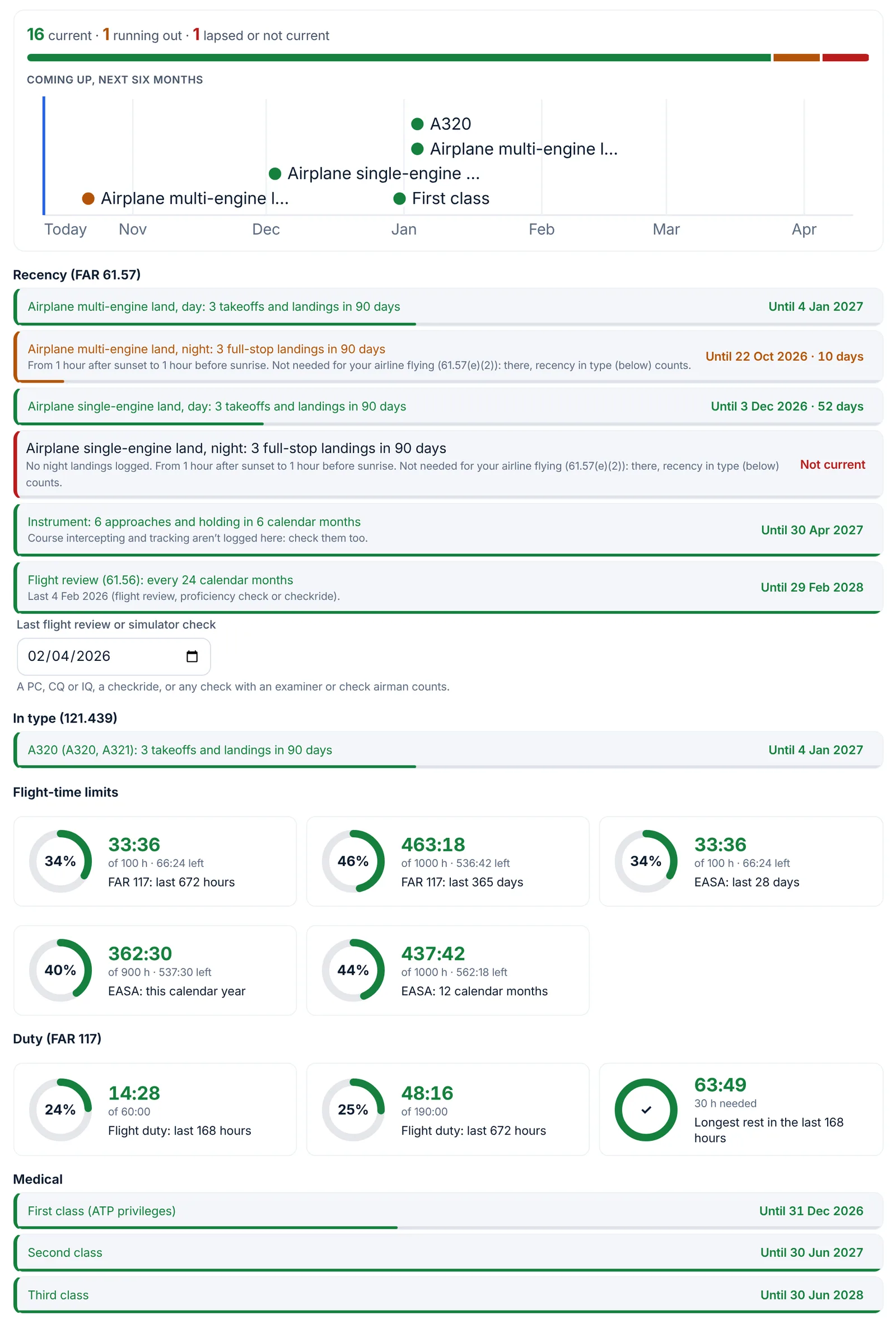
Each line ends with a status:
| Status | What it means |
|---|---|
| Until 8 Jul (green) | Current through that date. Within 60 days, the days left are added: "Until 8 Jul · 23 days". |
| Until 8 Jul (amber) | Current, but running out soon. |
| Expired 9 Jul (red) | The first day you weren't current. |
| Not current (red) | Nothing in your logbook meets the rule yet, or the date it needs is missing. |
"Soon" depends on the item: 14 days for landing recency, 30 days for instrument currency, checks and certificates, 45 days for the medical and 60 days for the flight review. For your own items you choose it.
At the top of the tab, a bar counts what's current, running out and lapsed, and a timeline marks every date that falls in the next six months. Each line has a small meter along its bottom edge: a full bar is six months or more left. Flight-time limits show as rings instead (see Duty and flight-time limits). Print or save as PDF prints the whole list.
First, set the rules you fly under
The items depend on the authority that issued your license. Choose it under License issued by, at the top of Reports → Currency or in About you:
- FAA (United States)
- EASA (European Union)
- UK CAA (United Kingdom)
- Aerocivil (Colombia)
- Another country (ICAO standard)
- Another authority: my own items, which shows only the items you add yourself, with a box for your authority's name.
Until you choose, LogAloft guesses from your crew base, then your airline, then where you live, and falls back to the FAA. Two other settings change what you see: Airline or company in About you (an airline pilot gets in-type recency and the airline notes below) and I also fly general aviation or train in Settings (which adds the flight review and per-class currency).
The FAA rules, and what LogAloft counts
Day takeoffs and landings: 14 CFR 61.57(a)
To act as pilot in command of an aircraft carrying people, or of any aircraft certificated for more than one pilot, you need at least 3 takeoffs and 3 landings in the preceding 90 days, as sole manipulator of the controls, in the same category and class (and type, if a type rating is required). If you'll fly a tailwheel airplane, they must be landings to a full stop in a tailwheel airplane. A full flight simulator or flight training device approved for landings counts when it's used in an approved course at a Part 142 training center.
What LogAloft counts. For each category and class you've flown in the last two years (airplane single-engine land, multi-engine land and so on), it looks back from your most recent flights and adds up the takeoffs and the landings until each reaches 3. You're current through the 90th day after the older of those two dates. The line reads, for example, "Airplane multi-engine land, day: 3 takeoffs and landings in 90 days".
- Landings come from Day landings plus Night landings, or All landings (touch-and-goes included) when that's higher. A night landing counts for day currency too.
- Takeoffs come from Day takeoffs plus Night takeoffs. If you left both empty, each landing counts as a takeoff.
- Only operating flights and simulator sessions count: never deadhead or passenger legs, and never flights still to come.
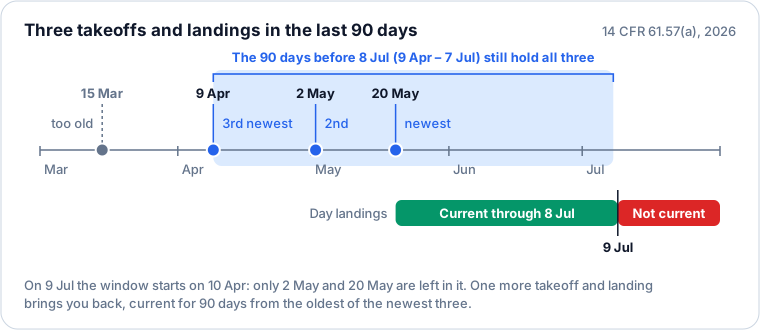
Pilots and inspectors count "the preceding 90 days" in slightly different ways, and the difference is one day at most. LogAloft keeps you current through the 90th day after your third-newest landing and shows the item as expired the day after. If you want a margin, plan your next landing before the amber warning starts.
Night takeoffs and landings: 61.57(b)
To carry people as PIC between 1 hour after sunset and 1 hour before sunrise, you need 3 takeoffs and 3 landings to a full stop in that same period, within the preceding 90 days, in the same category, class and type. Note that this period is not the same as logbook night time, which starts at the end of evening civil twilight; Recording flights explains both.
What LogAloft counts. The Night landings and Night takeoffs boxes, on the same rolling 90 days. The app can't tell whether a landing was to a full stop or more than an hour after sunset, so only log there the night landings that meet the rule. When the item isn't current, its note says when you last logged a night landing.
Tailwheel: 61.57(a)(1)(ii)
If you've flown an aircraft type marked as tailwheel, a line appears for 3 full-stop landings in 90 days in tailwheel airplanes. Full-stop landings are your day and night landings; touch-and-goes in All landings don't count here.
Instrument experience: 61.57(c) and (d)
To act as PIC under IFR, or in weather below VFR minimums, you must have performed and logged, within the 6 calendar months preceding the month of the flight:
- Six instrument approaches.
- Holding procedures and tasks.
- Intercepting and tracking courses through the use of navigational electronic systems.
They can be flown in actual or simulated conditions, in the aircraft or in a full flight simulator, flight training device or aviation training device that represents the category. If you fall behind, you have another six calendar months in which you can still catch up by flying the tasks (with a safety pilot or in a device). Once you've been out of currency for more than six calendar months, only an instrument proficiency check restores it (61.57(d)).
What LogAloft counts. It adds up approaches by calendar month, working back from the most recent, until it reaches six; you're current through the end of the sixth month after the month that completed them. Approaches come from the Approaches list on each flight (+ Add approach). Holds come from the Holds box: they don't change the date, but the note warns you when none are logged or the last one is over six months old. Intercepting and tracking isn't a logbook field, so the note reminds you to check it yourself.
A flight with Instrument proficiency check ticked (in the Training section, on the flight form's Crew tab) makes you current for six calendar months from the check, if that's later than what your approaches give.
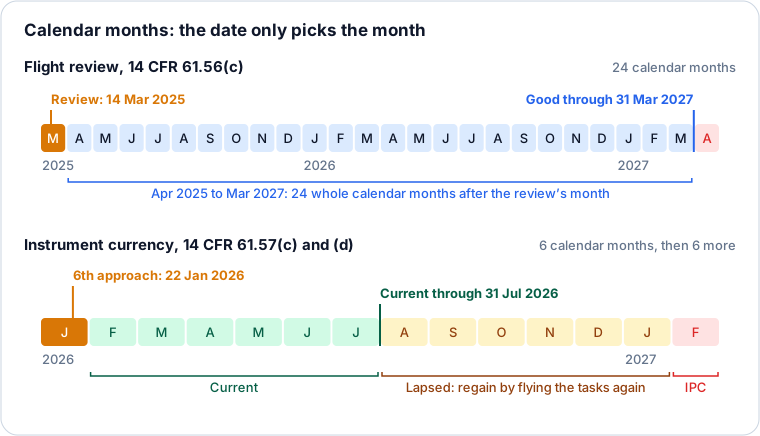
LogAloft shows the instrument line as expired from the first day of the seventh month, but it doesn't draw the catch-up period. Count six more calendar months from the expiry date: until then, six approaches, holding and tracking bring you back; after it, plan an IPC.
Flight review: 61.56
You may not act as PIC unless, since the beginning of the 24th calendar month before the month of the flight, you've completed a flight review (at least 1 hour of ground and 1 hour of flight training, with the instructor's endorsement). A pilot proficiency check or practical test with an examiner, an approved check airman or the U.S. Armed Forces, for a certificate, rating or operating privilege, takes its place (61.56(d)). For an airline pilot, the recurrent proficiency check does that job.
A flight review on 14 March 2025 is therefore good through 31 March 2027, as the diagram above shows.
What LogAloft counts. The latest of: a flight with Flight review (61.56) or Checkride ticked, or the date you type in Last flight review or simulator check (it appears under the flight review line in Reports → Currency). It adds 24 calendar months. The line shows up when you fly general aviation (the setting, or training and small-airplane flights in your logbook) or once you've entered a date.
Airline pilots: type the date of your last PC, CQ or IQ in Last flight review or simulator check after each one. That keeps the flight review line green for your general aviation flying without logging the simulator session as a flight review.
Medical certificate: 61.23(d)
A medical expires at the end of the last day of a month counted from the month of the exam. How many months depends on the class, the privileges you use and your age on the day of the exam:
| Medical | Used for | Under 40 at the exam | 40 or older at the exam |
|---|---|---|---|
| First class | ATP privileges as PIC (or SIC in a Part 121 flag or supplemental crew of 3 or more; any Part 121 pilot from age 60) | 12 calendar months | 6 calendar months |
| First or second class | Commercial privileges, ATP as SIC otherwise, flight engineer | 12 calendar months | 12 calendar months |
| Any class | Private, recreational, student, sport, flight instructor | 60 calendar months | 24 calendar months |
A first-class medical doesn't vanish when its first-class period ends: it steps down to second-class and then third-class privileges.
What LogAloft counts. Open the Medical certificate section of Reports → Currency, choose the Class, enter the Exam date, tick Under 40 at the exam if that applies, and tap Save. You get one line for each set of privileges the certificate still carries: "First class (ATP privileges)", "Second class" and "Third class", each running to the end of its month.
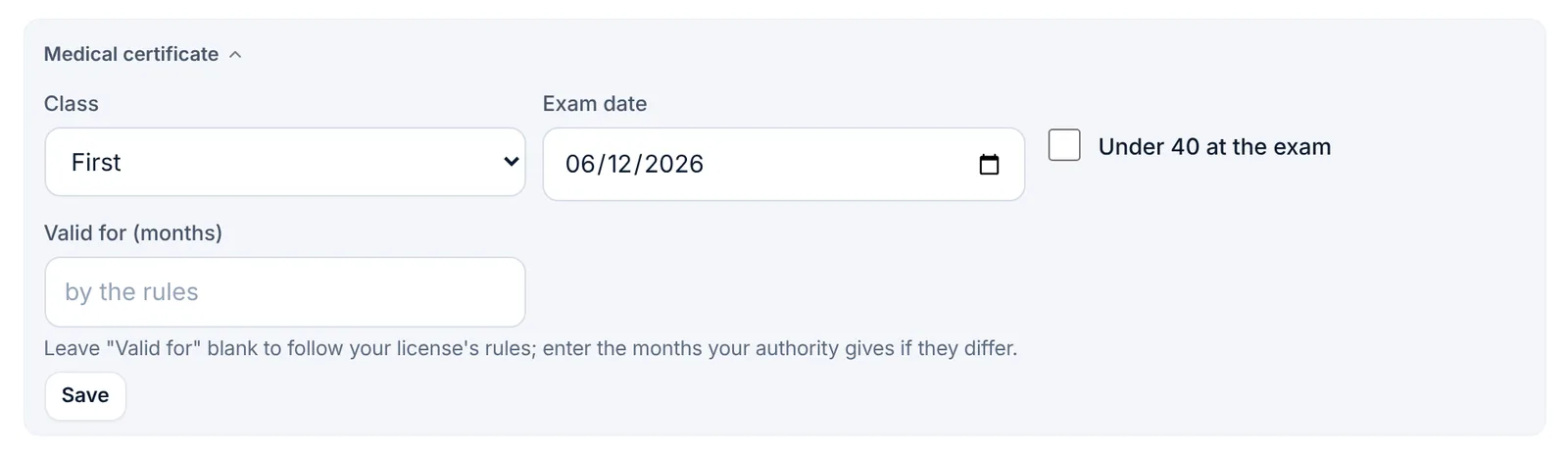
The age box is yours to keep right. LogAloft doesn't work out "under 40" from your date of birth: untick it at the first exam you take at 40 or older. If you fly as a two-pilot first officer, your ATP privileges as SIC need only second-class standards (unless you're 60 or older under Part 121), so the "Second class" line is the date that matters to you.
Valid for (months) overrides the rules: enter the months your certificate gives if your authority or a special issuance sets a different period.
Airline recency in type: 121.439
To serve as a required pilot under Part 121, you need 3 takeoffs and landings in the type within the preceding 90 days, in the airplane or in a Level B or higher full flight simulator approved for it. If you go past 90 days, you must re-establish recency under a check pilot's supervision: at least three takeoffs and landings including a simulated failure of the most critical engine on takeoff, a landing from an ILS approach to the lowest minimums authorized for your carrier and a landing to a full stop (121.439(b)).
While you comply with 121.439 (and 121.436), 61.57 doesn't apply to your flying for that carrier (61.57(e)(2)). That's why, once you've entered an airline, the night landing line carries the note "Not needed for your airline flying" and isn't counted on the Today tile.
What LogAloft counts. Under "In type (121.439)", one line for each type rating you've flown in the last 12 months. Variants under one rating count together: an A332, A333 or A339 landing keeps "A330" recency, and the B757 and B767 share one line. Types without a type rating (a C172) aren't listed. A type you haven't flown in 90 days (your previous fleet) stays in Reports but isn't counted on the Today tile.
Proficiency checks under 121.441 (for a PIC, one in the type within the preceding 12 calendar months, plus a check or an approved simulator course within the preceding 6) aren't counted automatically, and many carriers run them under an Advanced Qualification Program with its own cycle. Add them as checks (below) with the interval your training department gives you.
EASA and UK Part-FCL
Recent experience: FCL.060
A pilot may not operate an aircraft in commercial air transport or carrying passengers:
- as PIC or co-pilot without 3 takeoffs, approaches and landings in the preceding 90 days as pilot flying, in an aircraft of the same type or class or a full flight simulator representing it (FCL.060(b)(1));
- as PIC at night without 1 takeoff, approach and landing at night in the preceding 90 days as pilot flying, in the same type or class or a simulator, unless you hold an instrument rating (FCL.060(b)(2));
- as cruise relief co-pilot without meeting (b)(1), or 3 sectors as cruise relief pilot in 90 days, or refresher training in a simulator at intervals of no more than 90 days (FCL.060(b)(3)).
In commercial air transport, the 90 days can be extended to at most 120 days if you fly the line under the supervision of a type rating instructor or examiner (FCL.060(c)).
What LogAloft counts. With EASA (European Union) or UK CAA (United Kingdom) chosen, one line for each type rating (or class) you've flown in the last two years: "3 takeoffs, approaches and landings in 90 days", and a night line, "1 takeoff, approach and landing at night in 90 days", from your night landings. There's no setting for an instrument rating, so if you hold one, ignore the night line. The 120-day extension and cruise relief recency aren't tracked.
Type ratings and proficiency checks
A class or type rating is valid for 1 year (single-pilot single-engine class ratings: 2 years), unless the operational suitability data says otherwise (FCL.740(a)). To revalidate a multi-engine class or type rating you pass a proficiency check (the LPC) within the 3 months immediately before the expiry date (FCL.740.A(a)(1)). If you revalidate earlier than that, the new validity period starts on the day of the check (FCL.740(a)), so the 3-month window is what saves you days.
An airline adds its own checks: the operator proficiency check is valid for 6 calendar months, and the line check for 12 calendar months (ORO.FC.230(b) and (c)).
What LogAloft counts. The latest of a flight with Checkride or Instrument proficiency check ticked and the date in Last proficiency check. With an airline entered: "Operator proficiency check (ORO.FC.230): every 6 months", to the end of the sixth month. Without one, but with a type rating flown: "Type rating proficiency check (FCL.740): every 12 months", counted 365 days from the check, which can be earlier than the date on your license; the note says so.
Medical: MED.A.045
A class 1 medical is valid for 12 months, or 6 months from age 60 (and from 40 in single-pilot commercial air transport carrying passengers). A class 2 is valid for 60 months under 40, 24 months from 40 to 50, and 12 months over 50. When you revalidate, the new period counts from the old expiry date.
LogAloft counts a class 1 as 12 months and a class 2 as 60 or 24 months (by the Under 40 at the exam box), from the exam date. It doesn't apply the age-60 or over-50 rules, so enter Valid for (months) if they apply to you, or simply type the expiry on your certificate as a certificate (below).
Checks, training and documents
Anything with a validity period can live in Currency.
Checks and training
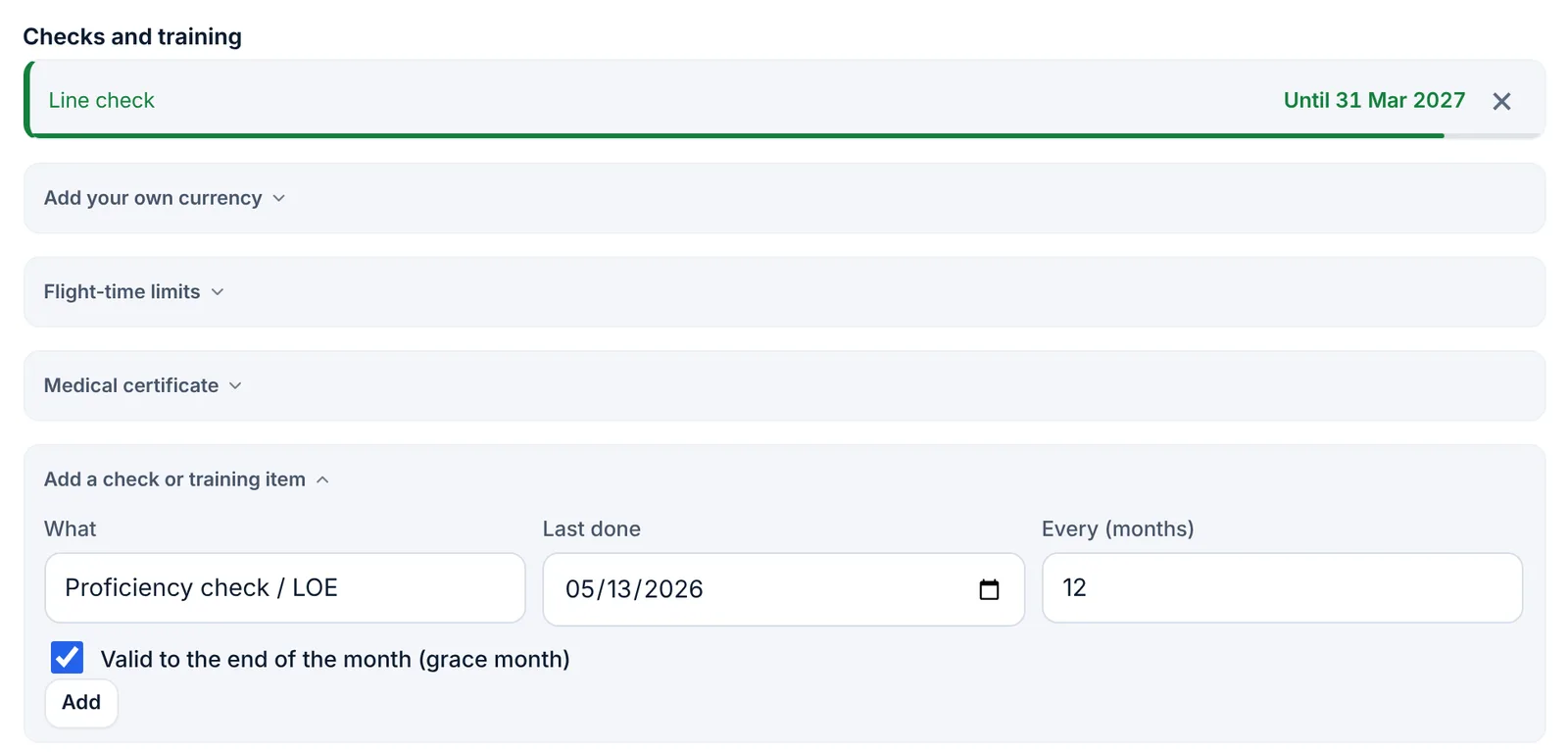
- In Reports → Currency, open Add a check or training item (if the tab shows section chips, look under Checks and training or More).
- In What, type a name or pick one: Proficiency check / LOE, Line check, Recurrent ground training, Emergency procedures (drills), Dangerous goods, Security training, CRM, Passport, Crew ID badge.
- Enter Last done and Every (months).
- Leave Valid to the end of the month (grace month) ticked for items that run in calendar months, as most training does; untick it for items that expire on the day.
- Tap Add. The item appears under "Checks and training", amber 30 days before it's due. Remove it with its ×.
When you complete the check again, add it again with the new date and remove the old line.
Certificates, endorsements and documents with an expiry date
Reports → Certificates keeps your certificates, ratings, medicals and endorsements. Tap + Add, choose What (Certificate or license, Rating, Medical, Endorsement or Other), give it a Title, a Number, a Date and, optionally, Expires. Anything with an expiry date shows in Currency under "Certificates and endorsements". This is the right place for a passport, a visa or an EASA medical whose date you'd rather copy than calculate.
Your own currencies
For a company rule or another authority's recency, build your own:
- Open Add your own currency and give it a Name ("Recency A330", "Company: 2 night landings").
- Under Flights, keep All flights or pick one of your smart groups (Reports → Smart groups): a type, a class, a tail, an airport.
- Set In the last (days).
- Under Needs, choose what must add up and at least how many: Landings, Day landings, Night landings (full stop), Takeoffs, Night takeoffs, Approaches, Holds, Flights, Hours, PIC hours or Night hours. + Another adds a line; every need must be met.
- Set Orange from (days left) and tap Add currency.
You're current until that many days after the oldest flight needed to meet every line.
Getting the inputs right
LogAloft can only count what's in your flights. Three habits make the currency screen trustworthy:
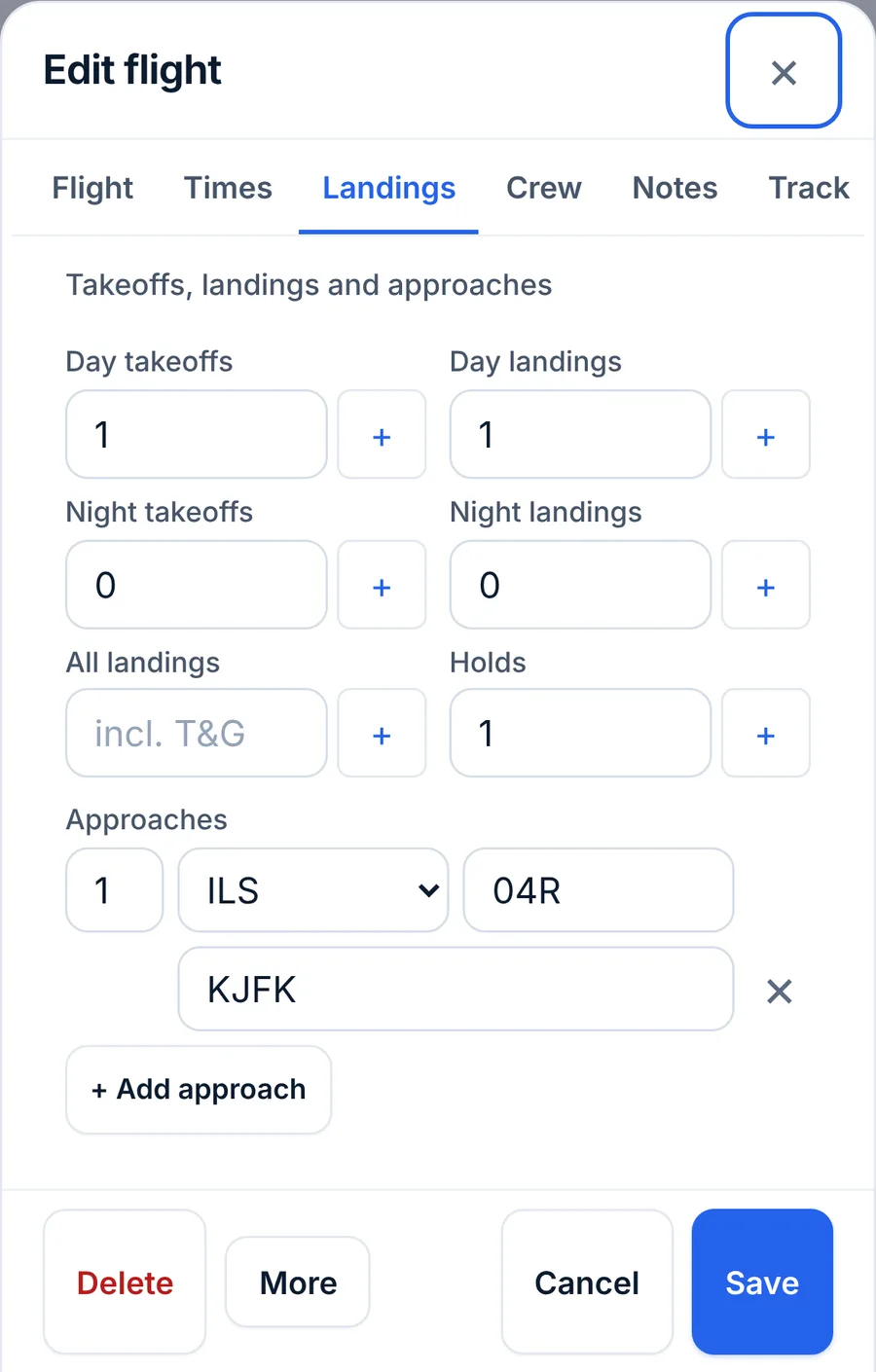
- Log takeoffs and landings on every leg you fly. On the flight form's Landings tab, each box has a + next to it. Ticking I was pilot flying, on the Times tab, fills in the takeoff and the landing, day or night, when you leave them empty. Imports from another logbook carry these numbers when the source had them.
- Add approaches and holds when you fly them, including in the simulator. A session logged with On board as set to Simulator counts for landings and approaches.
- Tick the training boxes. Flight review (61.56), Instrument proficiency check and Checkride are in the Training section on the flight form's Crew tab.
LogAloft doesn't know which simulator a session was in. A session in a device that isn't approved for landings, or not used in an approved course, still adds landings to your 61.57 lines if you log them. Log landings on simulator entries only when they count, or keep those sessions out of your landing boxes.
Reminders by email
Signed in, LogAloft emails you 60, 30 and 7 days before your medical or a check expires. Turn these emails off in Settings.
Common questions
Why does my night currency show red when I fly nights every week?
As an airline pilot you may be logging night time but not night landings, or logging them as day landings. Check a few recent flights: the night landing goes in Night landings. Also, with an airline entered, the 61.57(b) night line doesn't apply to your airline flying (61.57(e)(2)) and isn't counted on the Today tile; it stays in Reports for your general aviation flying.
I fly the A320 and the A321. Why is there only one line?
Both are under the A320 type rating, and 121.439 recency is per type. A landing in either keeps the "A320 (A320, A321)" line current. The same goes for the A330 family and the B757 and B767.
Does a deadhead or a commute count?
No. Only flights you logged as Operating crew and simulator sessions count toward recency. Deadhead and passenger legs count only for your radiation dose.
My instrument currency says "Not current" but I flew six approaches last month.
Check that they're in the Approaches list of each flight, not only in the remarks. An imported logbook brings approaches across when the source had an approach count column. Typing the approaches on the flights (or the import file) fixes it.
When I renew my medical early, which date counts?
The FAA counts from the month of the new exam. Enter the new exam date and the class; the old certificate no longer matters. Under EASA, a revalidation within 45 days before expiry counts from the old expiry date, so enter that date or use Valid for (months).
Can I see what the app counted?
Each line that isn't current says how many landings it found ("2 landings in the log") or when the last night landing was. For the details, Reports → Totals or a smart group of the same aircraft shows the flights behind the numbers.
Is this good enough for an inspector?
No. It's a planning aid. Your logbook entries are the record; the currency screen is a reading of them.
Sources
- 14 CFR 61.57, Recent flight experience: pilot in command (eCFR)
- 14 CFR 61.56, Flight review (eCFR)
- 14 CFR 61.23, Medical certificates: requirement and duration (eCFR)
- 14 CFR 121.439, Pilot qualification: recent experience (eCFR)
- 14 CFR 121.441, Proficiency checks (eCFR)
- Easy Access Rules for Aircrew, Regulation (EU) No 1178/2011: FCL.060, FCL.740, FCL.740.A and MED.A.045 (EASA)
- Easy Access Rules for Air Operations, Regulation (EU) No 965/2012: ORO.FC.230 (EASA)