Help › Your logbook
Official logbook pages, 8710 and exports
Print your logbook in your authority's page layout, fill in the FAA 8710 from your totals, take your data out in any of five files, and walk into a job interview or a checkride with a logbook that holds up.
Sooner or later someone asks to see your logbook: an airline recruiter, an examiner, an insurer, your authority. This guide covers every printed page and file LogAloft can produce, what each authority expects a logbook to contain, and a checklist for a job interview or a checkride logbook review.
Everything here works on every plan. A free logbook past its limit can still print and export everything in it.
Everything you can print or export
| What | Where | Format |
|---|---|---|
| Logbook pages in an authority's layout | Reports → Logbook pages | Print or PDF, landscape |
| FAA 8710 totals (IACRA section III) | Reports → FAA 8710 | On screen, print or PDF |
| Flight time résumé for applications | Reports → Résumé | Print or PDF; the class table as spreadsheet text |
| Totals for any period | Reports → Totals | Print or PDF |
| Experience by type, place, month or year | Reports → Experience | Print or PDF, CSV |
| A smart group's totals | Reports → Smart groups | Print or PDF |
| Radiation record | Reports → Radiation | Print or PDF, with a check code |
| Logbook spreadsheet | Reports → Files | CSV |
| Full backup | Reports → Files | JSON |
| A file other logbook apps import | Reports → Files | LogTen tab-delimited text, ForeFlight CSV |
| Your flights in a calendar | Reports → Files | .ics |
| Backups kept on our server | Reports → Files | Restore in the app |
Reports is in the toolbar on a computer, and under More on a phone. A long tab that doesn't fit your screen shows one section at a time, with a row of chips at its top to switch between them; the pictures in this guide show the sections all at once.
How printing works
Every Print or PDF button opens the report as its own page in a new tab, with a Print or save as PDF button at the top, and opens your browser's print dialog. To get a PDF, choose "Save as PDF" (or your phone's equivalent) as the printer. Logbook pages are laid out landscape: if your browser asks, choose Landscape.
If your browser blocks the new tab, LogAloft downloads the page as an .html file instead. Open it and print it from there.
Print your logbook pages
- Open Reports → Logbook pages.
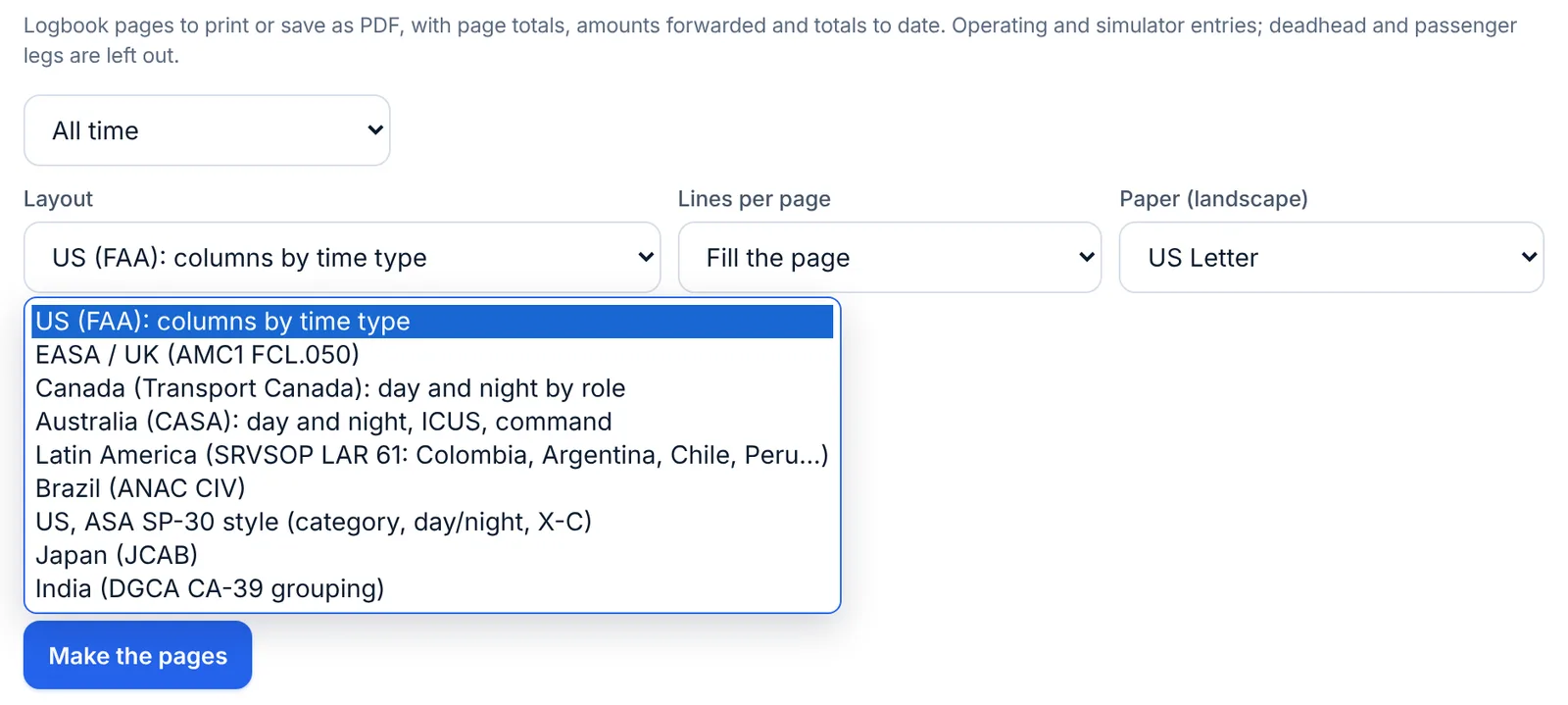
- Choose the period: All time, a recent window, Last year, or Choose dates…. The line below says how many entries that is.
- Choose the Layout from its drop-down menu (the layouts are described below). It's your browser's own menu, so it looks different on a phone, where it opens as a list or a wheel at the bottom of the screen.
- Leave Lines per page on Fill the page, or pick 12, 16, 20, 25 or 30 lines.
- Choose the Paper (landscape): US Letter or A4. LogAloft remembers it.
- Tap Make the pages.
What goes on the pages:
- Operating and simulator entries, oldest first by out time. Deadhead and passenger legs are left out: they aren't flight time.
- Times in UTC. Durations follow Settings → Show hours as, h:mm or decimal.
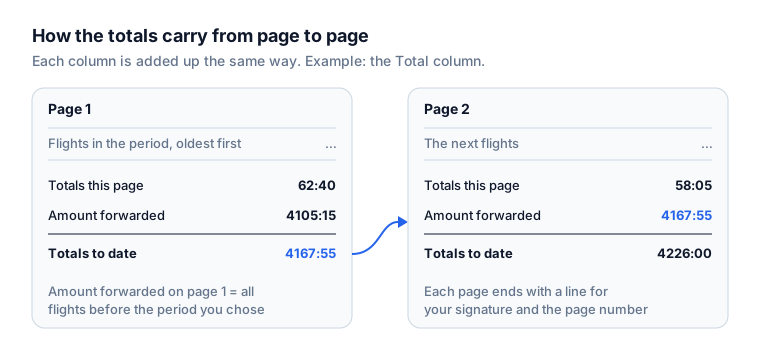
- Three total lines on every page: this page, the amount forwarded from before, and the total to date. On the first page, the amount forwarded is everything you logged before the period you chose, so printing only this year still carries your career totals.
- A certification line at the foot of each page, "I certify that the entries in this log are true.", with space for your signature and the page number.
- Your name at the top, as you typed it in Settings → Your name (or Your account → Name). Write it as it appears on your certificate.
With Fill the page, LogAloft measures the layout on your paper and fits as many lines as it can, shrinking the type slightly when the columns are wider than the page.
The layouts
| Layout | Columns |
|---|---|
| US (FAA): columns by time type | Date, type, tail, from, to, flight; approaches, day and night landings; night, instrument; when any flight in the period has them, simulated instrument, dual received, solo and dual given; cross-country, simulator, SIC, PIC, total; remarks (instructor and certificate, flight review, IPC, checkride, your remarks, crew) |
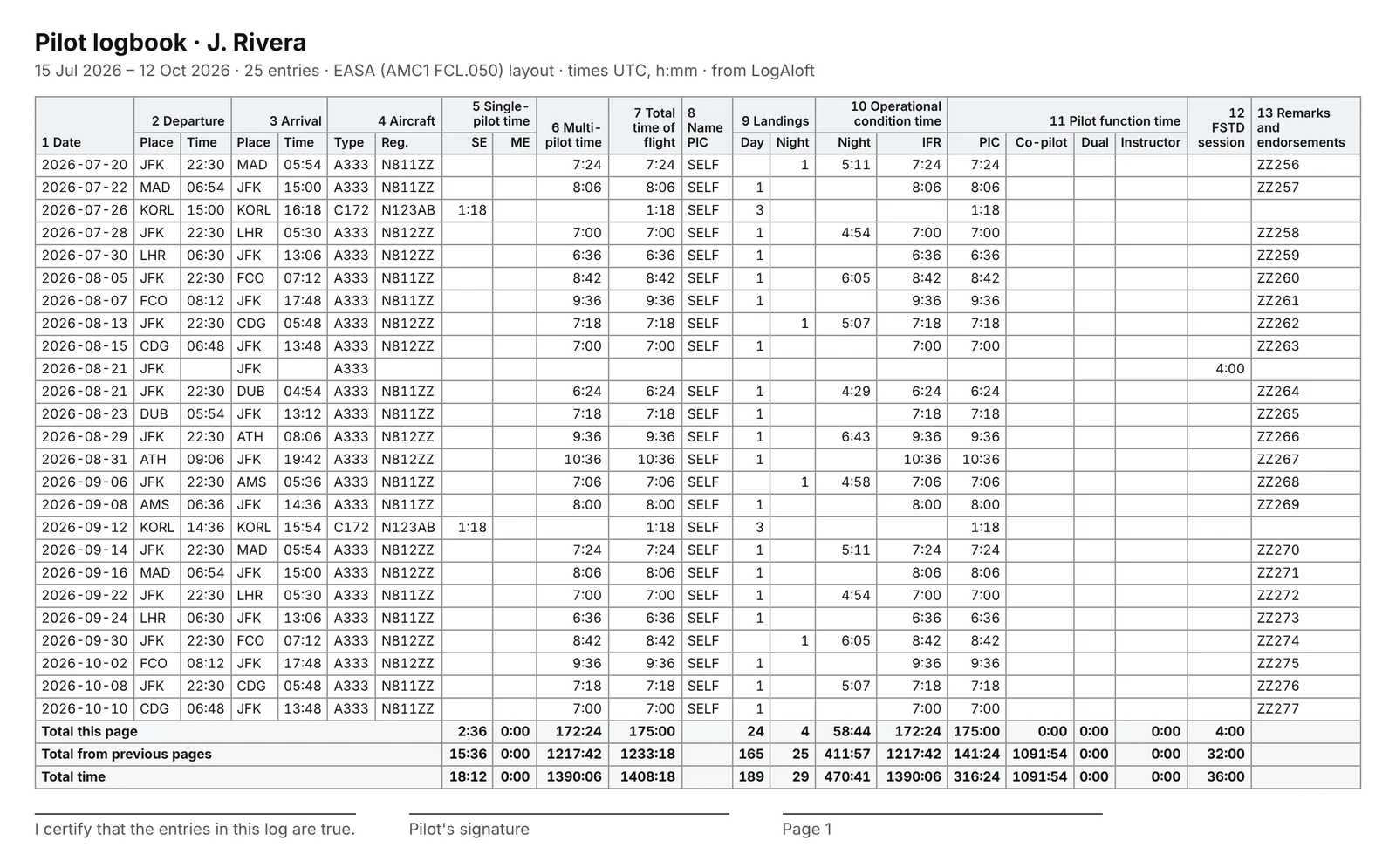
| EASA / UK (AMC1 FCL.050) | The 13 numbered column groups of the EASA logbook: 1 date; 2 departure place and time; 3 arrival; 4 aircraft type and registration; 5 single-pilot time, SE and ME; 6 multi-pilot time; 7 total time of flight; 8 name of the PIC; 9 landings day and night; 10 operational condition time, night and IFR; 11 pilot function time, PIC, co-pilot, dual and instructor; 12 FSTD session; 13 remarks and endorsements |
| Canada (Transport Canada) | Date, type, registration, from, to, PIC; day and night time each as dual, PIC and co-pilot; cross-country day and night; instrument actual, hood and simulator; IFR approaches; landings day and night; total |
| Australia (CASA) | Date, type, registration, PIC, route; day and night time each as ICUS, dual, command and co-pilot; instrument in flight and on the ground; approaches; landings day and night; total |
| Latin America (SRVSOP LAR 61) | In Spanish: single-pilot mono and multi, multi-pilot, total, landings, night and IFR, function (PIC, co-pilot, dual, instructor), FSTD |
| Brazil (ANAC CIV) | In Portuguese: day, night, total, navigation, instrument real and simulated, landings, simulator, and your function on each flight |
| US, ASA SP-30 style | Category (ASEL, AMEL), ground trainer, dual received, PIC, SIC, day, night, cross-country, actual, hood, approaches, landings, total |
| Japan (JCAB) | The numbered columns of the JCAB logbook, from landings (7) and flight time (8) through PIC, solo, PICUS, co-pilot and dual with their cross-country and night, instrument, simulator and instructor time (22) |
| India (DGCA CA-39 grouping) | Single-engine day and night (dual, solo), multi-engine day and night (under training, co-pilot, P1 under supervision, PIC), total, instrument, simulator and instructional time |
How LogAloft fills columns your flights don't spell out
Most flights don't say "single-pilot" or "day dual" in so many words, so some columns are worked out. Check these against how your authority wants them counted:
- EASA multi-pilot time (column 6): the multi-pilot time you logged; otherwise the whole flight when you logged SIC time, or flew a multi-engine jet or turboprop. The rest is single-pilot time, SE or ME by the type's class.
- EASA IFR time: the IFR time you logged; otherwise a multi-pilot (airline) flight counts as IFR throughout, and any other flight counts only its instrument time.
- EASA name of PIC (column 8): "SELF" when you logged PIC time, otherwise the name of the crew member you logged as PIC.
- Day and night by role (Canada, Australia, India): each role's night time is its share of the flight's night time. A flight you flew as PIC with 2:00 of night out of 6:00 shows 4:00 PIC day and 2:00 PIC night.
- Latin America, Japan, India, Brazil, ASA: single-pilot means a piston airplane and multi-pilot means a turbine one; "IFR" is your actual instrument time; cross-country and night are shared out among roles in proportion.
These are reasonable readings, not rulings. If your authority or employer counts multi-pilot, IFR or night differently, log those times on each flight (turn on Multi-pilot time and IFR time in Choose fields) and the printed pages use what you logged.
What each authority expects a logbook to hold
The pages are only as complete as your entries. Here is what the rules ask for, and where each item lives in LogAloft.
United States: 14 CFR 61.51
You must record, "in a manner acceptable to the Administrator", the training and aeronautical experience you use for a certificate, rating or flight review, and the experience you use for recent flight experience (61.51(a)). For each flight or lesson you log (61.51(b)):
| 61.51(b) asks for | In LogAloft |
|---|---|
| Date | Date |
| Total flight time or lesson time | Total |
| Where the aircraft departed and arrived (for a simulator lesson, where it took place) | From, To |
| Type and identification of the aircraft or training device | Type, Tail; Training device for simulators |
| Name of a safety pilot, if 91.109 requires one | A crew member with the role Safety pilot (shown as "Safety pilot: name") |
| Solo, PIC, SIC, flight and ground training from an authorized instructor, training in a simulator | Solo, PIC, SIC, Dual received, Ground training; On board as Simulator |
| Day or night, actual instrument, simulated instrument | Night, Instrument, Simulated instrument |
| Use of night vision goggles | No NVG field: use Remarks or a field of your own (Choose fields → Your fields) |
Some entries need more:
- Instrument currency (61.51(g)(3)): the location and type of each approach, and the safety pilot's name if one was required. Record approaches with + Add approach (type, runway, airport) rather than just a count. The US printed layout shows only the number of approaches, so for an instrument currency review, also bring the CSV or the flight entries, which hold the details.
- Training time (61.51(h)): endorsed by the authorized instructor, with a description of the training, the lesson's length, and the instructor's signature, certificate number and certificate expiration date (or recent experience end date). See instructor signatures.
- Showing it (61.51(i)): you must present your logbook for inspection on a reasonable request by the FAA, the NTSB, or a federal, state or local law enforcement officer.
FAA 8710 (IACRA)
When you apply for a certificate or rating, section III of FAA Form 8710-1, "Record of Pilot Time", asks for your time by category of aircraft and training device. The form's instructions ask you to complete at least the blocks that apply to the certificate or rating you're seeking, and recommend entering all your pilot time.
- Open Reports → FAA 8710. It shows when your base is a US airport or your airline is a US airline.
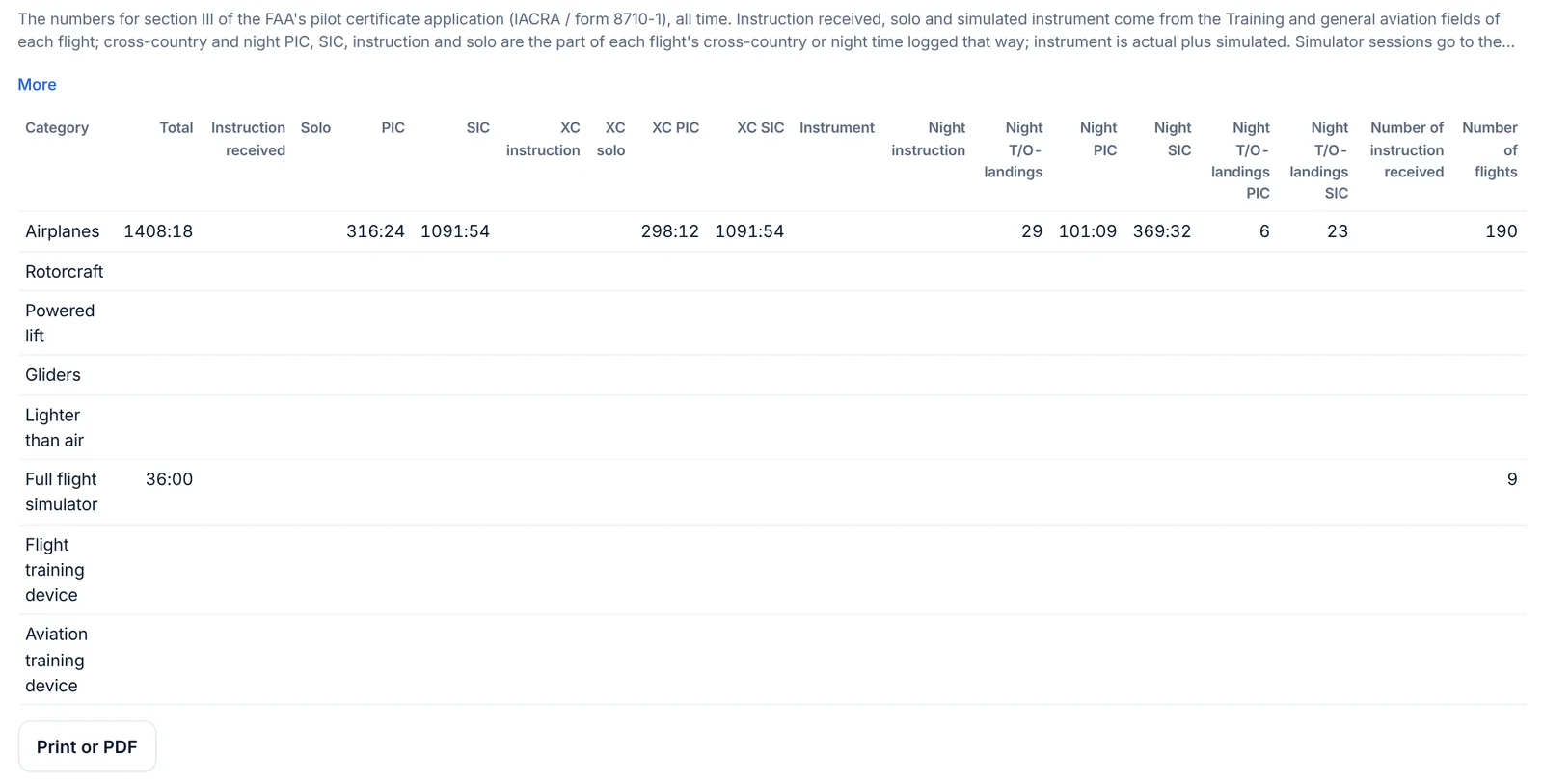
- Read the table (if the tab shows section chips at the top, tap the one with the table): one row per category (Airplanes, Rotorcraft, Powered lift, Gliders, Lighter than air) and per device (Full flight simulator, Flight training device, Aviation training device).
- Copy each number into IACRA, or tap Print or PDF to keep a dated copy with your application.
How each column is filled:
- Total, PIC, SIC, solo, instruction received: the sums of those times on each flight. Instruction received, solo and simulated instrument come from the Training and general aviation fields.
- Cross-country and night columns by role (instruction, solo, PIC, SIC): for each flight, the smaller of its cross-country (or night) time and its time in that role. A 3:00 cross-country flight with 3:00 PIC adds 3:00 to "Cross country PIC".
- Instrument: actual plus simulated instrument.
- Night takeoffs and landings: your night takeoffs plus night landings; the PIC and SIC columns count them on flights where you logged PIC or SIC time.
- Number of instruction received, number of flights: counts of flights.
- Simulator rows: each session goes to the row of its training device (Training device on the flight).
- Category: from each type's category and class. A type with no class set counts as an airplane.
The table covers all time; it doesn't do a period. It doesn't fill the form's "Class Totals" block (time by SEL, MEL, SES and MES as PIC, SIC and instruction received) or the glider launch and tow counts: take those from a smart group per class (Category and class is…) or from your records. Check every number against your logbook before you sign the application: your signature on the 8710 certifies it, not LogAloft.
EASA and the UK: FCL.050 and AMC1 FCL.050
FCL.050 says a pilot shall keep a reliable record of the details of all flights flown, in a form and manner established by the competent authority. AMC1 FCL.050 sets out what the record should contain at least:
- your name and address;
- for each flight: the name of the PIC; the date; the place and time of departure and arrival; the aircraft type (make, model and variant) and registration; whether it's SE or ME; the total time of the flight; the accumulated total;
- for each FSTD session: the device's type and qualification number, the instruction, the date, the session's time and the accumulated total;
- your pilot function: PIC (including solo, SPIC and PICUS), co-pilot, cruise-relief co-pilot, dual, FI or FE;
- the operational conditions: night, and flight under IFR.
The EASA layout above prints these in the AMC's column order. Things to add yourself:
- Your address isn't printed: write it on the first page.
- The FSTD's qualification number isn't a field: put it in the session's remarks.
- Countersignatures: AMC1 FCL.050 lets you log solo, SPIC and supervised time, and successful skill tests, proficiency checks and assessments of competence, as PIC time when the instructor or examiner countersigns them. Use LogAloft's signatures, or have the printed page signed.
- Cruise-relief co-pilot: Amendment 13 of the AMC (2025) asks for "CRCP" in the remarks when you acted as cruise-relief co-pilot. Select those flights and use Change… → Add to remarks with "CRCP".
The UK CAA applies the same Part-FCL text in its own version of the rules.
Canada: CAR 401.08
Every holder of a Canadian flight crew permit, licence or rating must keep a personal log. For each flight it must show your name and the date; the aircraft type and registration; the flight crew position you held; the flight conditions (day, night, VFR, IFR); for an aeroplane or helicopter, the places of departure and arrival; for an aeroplane, all intermediate takeoffs and landings; and the flight time. Only you, or someone you authorize, may make entries. LogAloft logs each leg separately, so intermediate stops are already their own entries.
Australia: CASR Part 61
CASA's rules on personal logbooks are in regulations 61.345 (pilots), 61.355 (keeping them) and 61.365 (producing them). The CASA layout prints the day and night, ICUS, dual, command and co-pilot columns its paper logbooks use. Check CASA's pages for the details your licence needs.
Other authorities
The Latin American, Brazilian, Japanese and Indian layouts follow the column groups of those logbooks, labeled in Spanish, Portuguese or English. They're meant to be read alongside your authority's own requirements, which LogAloft doesn't restate.
LogAloft is a record-keeping aid. Your authority, your examiner and your operator decide what format they accept and how each kind of time is counted. When in doubt, ask them before you print a career's worth of pages.
Files and backups
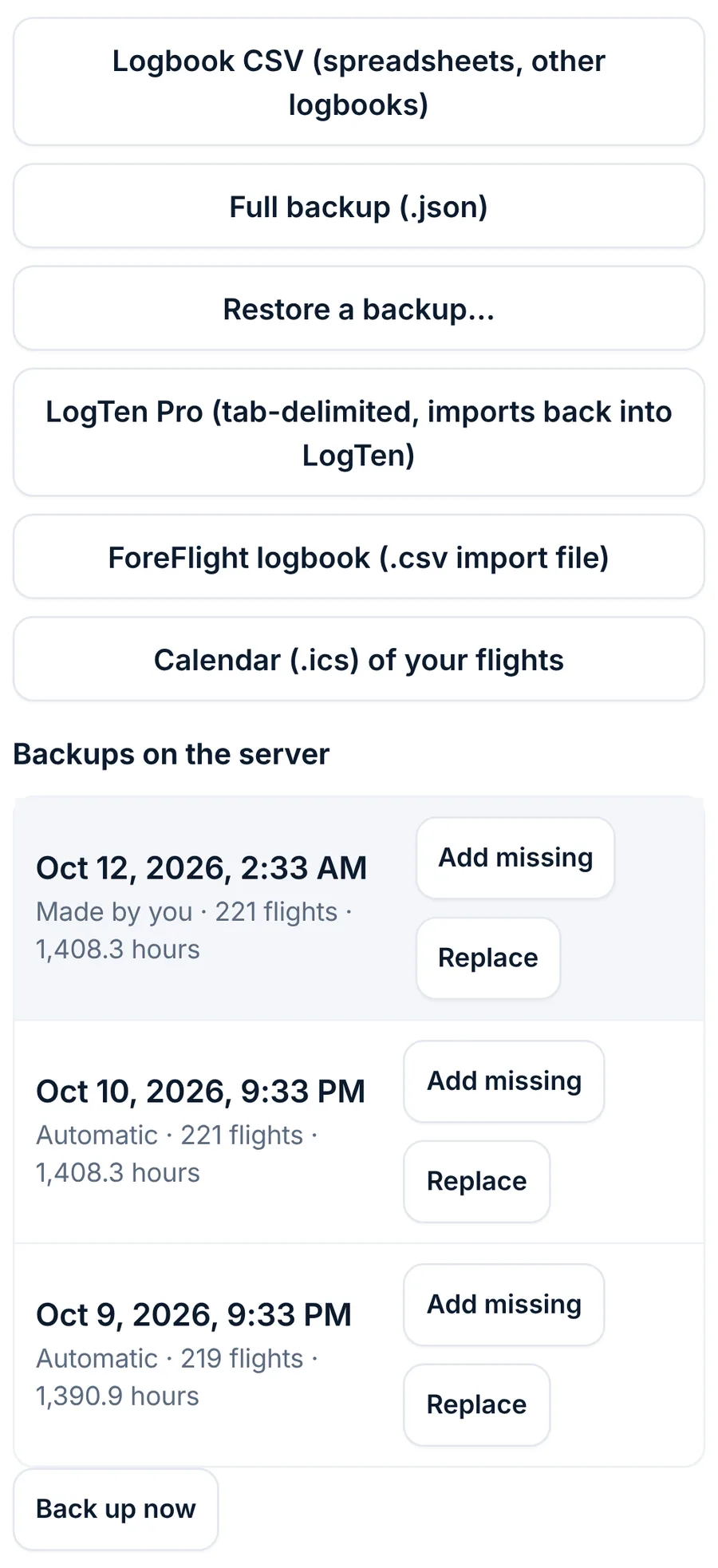
All of these are in Reports → Files.
| Button | What you get |
|---|---|
| Logbook CSV (spreadsheets, other logbooks) | Every flight, deadhead and passenger leg, one per row: date, flight, airports, out and in (UTC), type, tail, role, seat, every time and count, approach details, crew, dose and remarks. Times follow your h:mm or decimal setting. An empty cross-country field is written as the reports count it (see below). Opens in Excel, Numbers or Google Sheets |
| Full backup (.json) | Everything: flights, crew and aircraft records, settings and the change history. The only file that brings back everything |
| Restore a backup… | Reads a full backup and adds the flights that aren't already in your logbook. Flights already here are kept |
| LogTen Pro (tab-delimited, imports back into LogTen) | All but passenger legs, in LogTen's column names. An empty cross-country field is written as the reports count it |
| ForeFlight logbook (.csv import file) | Operating and simulator entries with an aircraft table, in ForeFlight's import template: clock times hhmm, decimal hours |
| Calendar (.ics) of your flights | Each flight with out and in times as a calendar event, with type, tail, total and dose |
Backups on the server (signed in): LogAloft backs up your logbook every day it changes and whenever you tap Back up now, and keeps the last 7 days, one a week for 8 weeks, one a month for 12 months, and the last 10 you made. Each backup offers Add missing (bring back flights that are gone) and Replace (make your logbook that backup, after backing up the current one).
Keep a full backup (.json) of your own somewhere safe, say once a quarter and before any big import or delete. It's your logbook in a file, readable without LogAloft.
The radiation record
Reports → Radiation → Print or PDF: radiation record prints your cosmic radiation dose by year and flight by flight, with how each dose was worked out. Signed in, the printout carries a check code and a fingerprint of the flight list: whoever you hand it to (an employer, a doctor) can enter the code at logaloft.com/verify/ to see that the record was made by LogAloft on that date and what it covered. See the method.
Before a job interview
Airline recruiters often ask for your logbooks and an application with totals by type, class and seat. A week before:
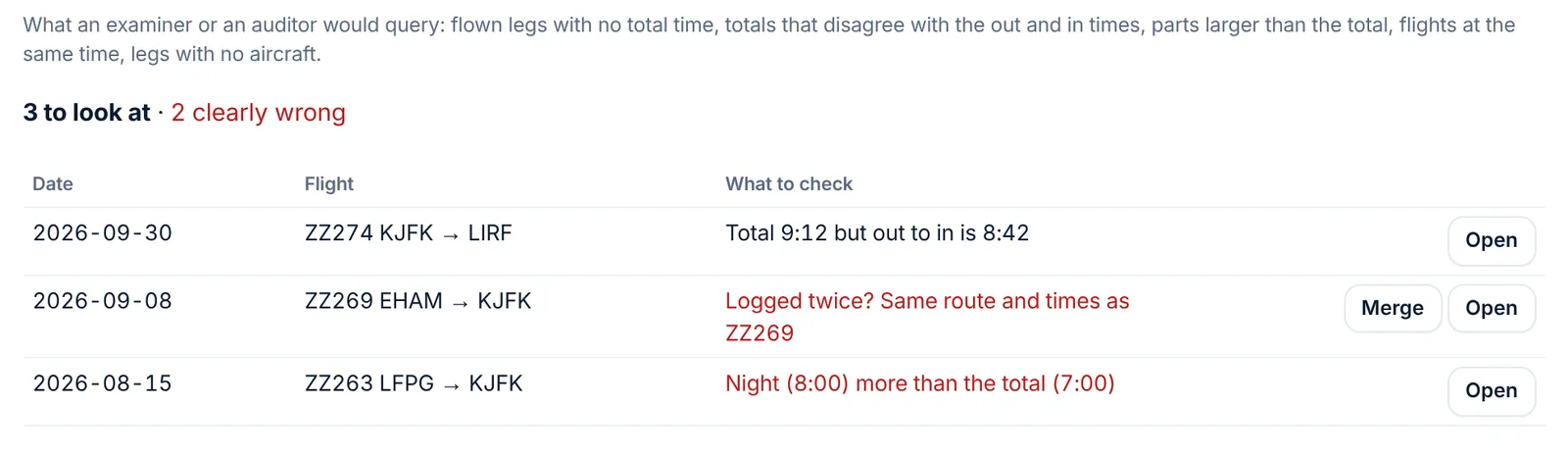
- Run the check. Reports → Logbook check lists what an examiner or auditor would query: flown legs with no total time, totals that disagree with out and in, parts larger than the total, overlapping flights, flights logged twice (with Merge) and legs with no aircraft. Open each one and fix it.
- Reconcile with your employer's records. Compare your last 12 months with your company's or your scheduling system's flight-time totals. Small differences are usually rounding or block versus air time; large ones are missing or duplicated legs.
- Fill in the application from the Résumé. Reports → Résumé has total, turbine, turbine PIC and SIC, jet, multi-engine and multi-engine PIC, PIC, SIC, night, instrument, cross-country and simulator, your last 12 months, 6 months and 90 days, and the time by class. copy as a spreadsheet gives the class table in decimal hours. Use the same numbers everywhere: application, résumé and interview.
- Print the pages they'll look at. Usually Logbook pages for all time in your authority's layout. Sign each page. Bring your earlier paper logbooks too if your first flights are in them.
- Know the edges of your numbers. Be ready to say how you logged PIC and SIC, how you count cross-country and night, and whether your totals are block or air time (Settings → Total time on a new flight from).
Before a checkride (FAA)
- Check the experience. Reports → Progress shows your hours toward the ATP, R-ATP, instrument rating or commercial certificate. It counts hours only; training content and simulator limits are yours to check.
- Get the endorsements. 14 CFR 61.39(a)(6) requires an endorsement from an authorized instructor certifying that you received and logged training within the 2 calendar months before the month of application, that you're prepared for the test, and that you've shown knowledge in the areas you missed on the knowledge test. In Reports → Certificates, add an endorsement starting from Practical test: 61.39(a)(6)(i) and (ii), and have your instructor sign it.
- Make sure training entries are signed. Every dual flight you count must carry the instructor's signature, certificate number and expiration (61.51(h)). Search "signed" in your flight list to see which ones are.
- Fill in the 8710 in IACRA from Reports → FAA 8710, and print the tab to bring along.
- Bring the logbook in a form your examiner accepts. Ask ahead whether they review it on your device or want printed pages. If printed, print Logbook pages in the US layout, sign each page, and bring the endorsements printed from the Certificates tab.
For an EASA skill test or proficiency check, the same idea applies: make sure the countersignatures AMC1 FCL.050 asks for are in place, and ask your examiner which format they want.
Common questions
Can I print just this year but keep my career totals?
Yes. Choose the period and print: the first page's amount forwarded holds everything before it.
Why are my deadhead legs missing from the printed pages?
They aren't flight time. They're in the CSV and in your radiation record.
The 8710 tab isn't there.
It shows when your base is a US airport or your airline is a US airline. Set your Crew base in Settings.
Is a LogAloft printout an official logbook?
It's a printout of your record in the layout your authority uses, signed by you. Whether a particular examiner, employer or authority accepts it is theirs to decide.
Will the CSV open in another logbook app?
Most logbook apps import CSV with a column-matching step. For LogTen and ForeFlight, use their own export buttons above.
Does printing need an internet connection?
No. Pages and reports are made on your device. The radiation record's check code needs a connection.
Sources
- 14 CFR 61.51, Pilot logbooks (eCFR)
- 14 CFR 61.39, Prerequisites for practical tests (eCFR)
- FAA Form 8710-1, Airman Certificate and/or Rating Application (FAA, 03-2026 edition, with instructions)
- EASA Easy Access Rules for Aircrew (Regulation (EU) No 1178/2011): FCL.050 and AMC1 FCL.050
- EASA ED Decision 2025/002/R, AMC and GM to Part-FCL, Amendment 13 (cruise-relief co-pilot entries)
- Canadian Aviation Regulations, 401.08 Personal Logs (Justice Laws)
- Civil Aviation Safety Regulations 1998, Part 61 (Federal Register of Legislation): regulations 61.345, 61.355 and 61.365