Help › Account and more
Your account, devices, privacy and plans
How you sign in, how your logbook stays the same on every phone and computer, what works offline, how to back up, export and delete, what LogAloft keeps and where, and how the free plan, Pro and its trial work.
Your logbook is a legal record and years of work, so you should know exactly where it lives and how to get it back. This guide covers signing in, using LogAloft on several devices, working offline, backups and exports, deleting flights or the whole account, what data the app keeps, and how plans and billing work. It applies to everyone, free or Pro.
Signing in
LogAloft has no separate sign-up form. You sign in with your email, and the first sign-in creates the account.
- Open the logbook at /new/ and tap Sign in (on a phone: More → Sign in).
- Type your email and tap Email me a code.
- Open the email titled "Your LogAloft code" and type the code in the Code box, then Continue. The code expires in an hour. You can also open the link in the email, but only on the same device and browser.
- Flights already on that device go into your account. A flight that's already in the account isn't added twice.
On iPhone and iPad, a LogAloft icon on the Home Screen keeps its own storage, separate from Safari. A link in the email opens Safari, so it signs in Safari, not the icon. Type the code instead: it signs you in wherever you typed it.
A password, if you prefer
In Your account, under Password, type at least 8 characters and tap Save password. Then, on the sign-in screen, Use a password instead shows a password box and Sign in with password. If you forget it, tap Email me a code: a new password typed in the box is saved once you enter the code.
Changing your email
In Your account, tap Change next to your email, type the new address and tap Send code. Type the code sent to the new address and tap Confirm. If the old address gets a message too, confirm there as well. From then on you sign in, and forward flights, from the new address.
When a sign-in expires
If a sign-in ends on its own (not by Sign out), the logbook grays out and says "Your sign-in expired", with Sign in and Not you? Clear this device. Your flights are safe in your account. If the device is offline at that moment, it says to sign in when you're back online.
Several devices: how sync works
Each phone, tablet or computer you sign in on keeps its own full copy of your logbook. Your account holds the master copy. Sync keeps them the same.
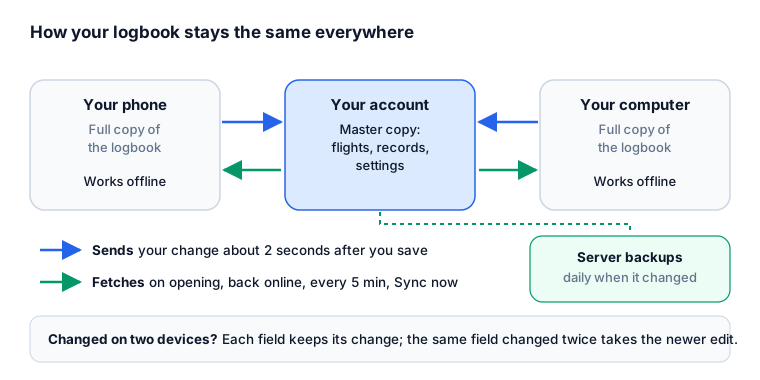
| What | When |
|---|---|
| Your change is sent | About 2 seconds after you save it |
| Other devices fetch changes | When the app opens or comes back to the screen, when the connection comes back, every 5 minutes while it's open, and on Sync now |
| Settings | Travel with the account, except a roster calendar link, which stays on the device where you added it |
| Pregnancy dose tracking | Kept on that device only, never in the account or its backups |
To check, open Your account: under your email it says how many flights you have and when the last sync, the last send and the last receive happened. The note at the top of the logbook says "Saved to your account and synced across your devices · 2 min ago", or "Not synced: …" with the reason. Changes made while sync fails are kept on the device and sent when it works again.
When the same flight changes on two devices
LogAloft remembers what each recently changed flight looked like at the last sync. If you edit a flight on your phone and the same flight on your computer before they sync:
- a field you changed on only one device keeps that change;
- a field changed on both takes the value from the more recent edit.
So adding the tail on your phone and the night time on your computer gives you both. For flights untouched for 90 days, the whole newer copy wins. A flight deleted on one device is deleted everywhere on the next sync.
Sync compares edit times. A device whose clock is far off can win or lose a conflict it shouldn't. Keep automatic time on in your phone's settings.
Offline
LogAloft is a web app that installs to your home screen and opens without a connection. Everything already on the device works offline: the logbook, search, totals, currency, duty and rest reports, and the trips you've already loaded. You can add and edit flights; they're sent when you're back online.
When the connection drops, an Offline pill appears at the top ("No connection" when the server can't be reached). These need a connection: live gates and times, weather, alerts, commuting options, flown tracks and new doses, imports read on the server, and sync.
Backups and export
Open Reports (on a phone: More → Reports) and choose the Files tab.
| Button | What you get |
|---|---|
| Logbook CSV (spreadsheets, other logbooks) | One row per flight, for Excel, Numbers, Google Sheets or another logbook's importer |
| Full backup (.json) | Everything: flights, their edit history, crew and aircraft records, certificates and settings. The file LogAloft restores from. |
| Restore a backup… | Adds the flights from a .json backup that aren't already in the logbook. Nothing already there is changed. |
| Calendar (.ics) of your flights | Every flight with out and in times, for a calendar app |
| Two files shaped for other logbook apps' importers | The buttons name the app each is for |
Keep the .json file private: it includes your settings, and your roster's calendar link if you added one. Printed logbook pages, FAA 8710 totals and a flight-time résumé are in the other Reports tabs.
Backups on the server
Signed in, your logbook is also backed up on LogAloft's server. The list is under Backups on the server in the same tab. A backup is made automatically each day your logbook changed, and any time you tap Back up now. LogAloft keeps the last 7 days, one a week for 8 weeks, one a month for 12 months, and the last 10 you made yourself.
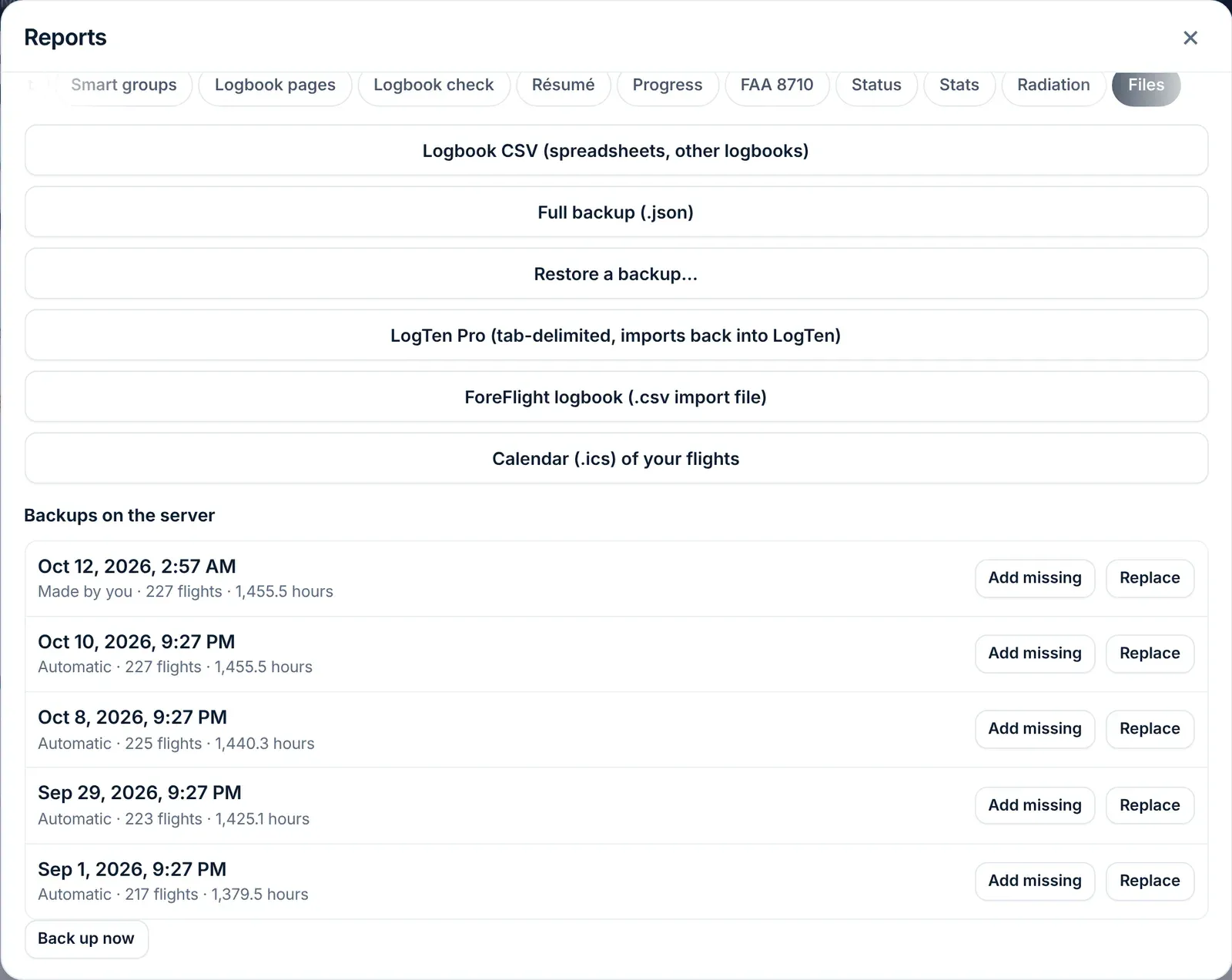
Each backup has two buttons:
- Add missing brings back flights that are in the backup but not in your logbook. Nothing else changes.
- Replace makes your logbook exactly the backup. Anything added or changed since then goes, so LogAloft backs up your logbook as it is first.
Before a big import or a cleanup, tap Back up now. If the result isn't what you wanted, Replace puts you back.
Deleting flights versus deleting the account
| You want to | Where | What happens |
|---|---|---|
| Delete one flight | Open it → Delete | Gone from every device. |
| Delete several | In the flight list, Select, tick them, Delete | Gone from every device. |
| Delete recent flights | Your account → Delete → Flights from the last 1, 7, 30, 90 or 365 days → Delete these flights… | Flights scheduled after today stay, and so do signed or locked flights unless you tick Also delete the N signed or locked flights. Type DELETE to confirm. You can bring them back for 30 seconds. |
| Delete every flight | Delete all flights… | The account stays, empty except for signed or locked flights, unless you tick to delete those too. Type DELETE. 30 seconds to undo. |
| Close the account (keeps 90 days) | Close my account… | Type your account's email to confirm. You're signed out everywhere and any paid plan is canceled. Your account and flights are kept, hidden, for 90 days. To bring it back, sign in with your email and tap Email me a restore link; the link works for an hour. A paid plan isn't restored. After 90 days everything is erased. |
| Delete the account now | Delete my account and its flights… | Type your account's email to confirm. Cannot be undone. |
| Remove LogAloft's copy from one device | Your account → Sign out, or Settings → This device → Delete all flights on this device | The copy on this device goes; your flights stay in your account. |
Deleting the account first cancels any paid plan, so nothing keeps charging you; if the payment service can't be reached, the account isn't deleted and you're asked to try again. Then it deletes the account, every flight and record, your server backups, track files and photos, your share link and your reminder emails. Other devices that were signed in show "Your sign-in expired"; use Not you? Clear this device there to remove what's left on them.
Settings → This device → Delete all flights on this device clears this device's copy only, with its edit history. When you're signed in, your account keeps every flight and they come back here at the next sync. It won't run while the logbook is syncing (try again in a moment), and it warns you when changes made on this device haven't reached your account yet, because those are lost. To delete flights from your account, use the Delete section of Your account. Download a Full backup (.json) before any delete.
When you sign out, LogAloft syncs first. If some changes haven't reached your account, it warns you before it removes them.
What LogAloft keeps, and where
This is a summary of the privacy policy; the policy is what counts.
| Where | What |
|---|---|
| Your device's browser storage | Your sign-in session, a copy of your logbook (so it opens instantly and offline), settings, and whether you have Pro. Signing out removes the logbook copy. |
| The account database (Supabase) | Your account, logbook, each earlier version of a flight (an audit trail), profile, settings and flight alerts |
| LogAloft's hosting (Netlify) | Server backups of your logbook, track files, and short-lived caches of flight lookups |
| Stripe | Your card and billing details. LogAloft sees only the card's brand and last four digits. |
The policy says LogAloft never sells your data, never shares your flights with airlines or employers, has no ads or tracking cookies, and doesn't use your logbook to train AI models. It may publish statistics combined from at least 10 people with nothing that identifies anyone. Emails and files you forward are read and not kept. Its providers process data in the United States and the European Union.
Some features send specific data to a provider for one job: photos of paper logbook pages and crew-app screenshots go to OpenAI to be read (not kept by LogAloft), alerts and commuting send flight numbers and airports to a flight-status service, and support requests go to the help desk. The policy lists each one.
Plans and billing
| Free | Pro | |
|---|---|---|
| Price | $0 | By role: pilots, cabin crew, travelers |
| Logbook | First 25 flights or 50 hours, whichever comes first | Unlimited |
| Flown tracks | Every flight between US airports, plus 2 others a month | Every flight worldwide |
| Imports, email forwarding, reports, sync | Yes | Yes |
| Gate and delay alerts, commuting options, the inbound aircraft | No | Yes |
When the free logbook is full it becomes read-only: you can see, search, export and delete flights, but not add or change them. If a device holds more flights than the account will take (for example flights added before you signed in), the account refuses the extra ones and the logbook says "3 flights are only on this device" until you go Pro or make room. The account screen shows your count: "Logbook: 25 of 25 flights · 41.2 of 50 hours".
The 14-day trial
Where Pro is sold, your first plan starts with 14 days free, one trial per person. Use them to bring in your whole history. You add a card in Stripe's checkout, and nothing is charged during the 14 days. During the trial Your account → Plan and billing shows "LogAloft Pro · free trial" and the end date. Cancel before it ends and nothing is charged: the account stays free. If you don't cancel, the plan starts and your card is charged when the trial ends.
Accounts opened before October 14, 2026 got their 14 days without a card. When those end, the account stays free unless you choose a plan.
Pro isn't sold in the European Union, the EEA or the UK at the moment. There, Plan and billing says "LogAloft Pro isn't available in your country yet", and everything in Free keeps working.
Upgrade, switch, cancel
- Open Your account (on a phone: More, then your name) and scroll to Plan and billing. Go Pro in the logbook opens the same place.
- Pick the Country of your billing address, then the yearly or monthly button.
- Pay in Stripe's checkout. Your card details go to Stripe, never to LogAloft. When it's done, the logbook says "Thank you: your plan is active."
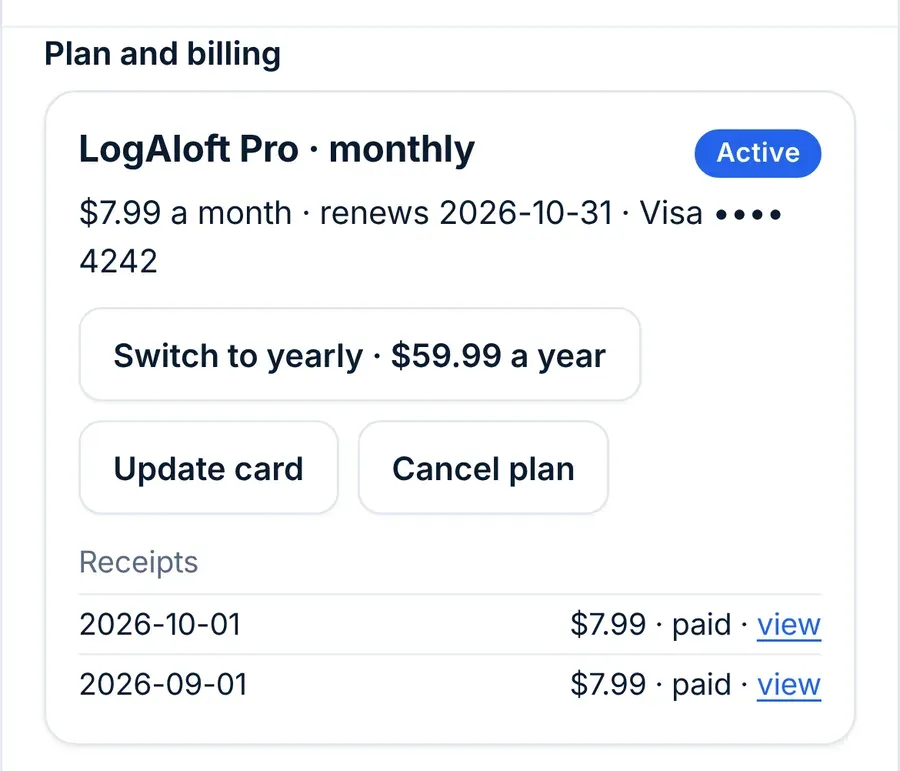
With a plan, the same section shows the plan, its renewal date and card, and these buttons:
- Switch to yearly or Switch to monthly: the difference is prorated on your next bill.
- Update card: opens Stripe's billing page.
- Cancel plan: Pro stays on to the end of the period you paid for, then your logbook goes back to the free features. Nothing is deleted. Until then, Keep my plan undoes the cancellation.
- Receipts: your last invoices, each with a link.
If a payment fails, the section says "The last payment didn't go through. Update your card to keep your plan."
Refunds
The terms of service say: plans are billed in advance and renew until canceled; refunds are given for the unused part of a yearly plan on request within 30 days of a renewal. To ask, write to support from your account's email. The terms also set fair use for Pro at about 200 flown tracks, 150 alerts and 60 commuting searches a month.
Free months: invites and prizes
Invite a friend (in Your account or More) gives you a link to share. When someone opens a new account through it and keeps Pro past their second monthly payment, or 14 days into a yearly plan, you each get a month of Pro free: your next renewal moves a month later, or you get a month of Pro right away if you aren't subscribed. Up to 12 months a year. Your own accounts, an account opened on a device where yours was signed in, and a card already on your account don't count. The dialog shows how many months you've earned this year.
The weekly prize in the Fly the Dose game also pays in days of Pro, added the same way. Prize and invite months have no cash value.
Language and units
All in Settings:
| Setting | Choices |
|---|---|
| Language | English (US), Español, Français, Português (Brasil). Numbers and dates follow the language. |
| Show hours as | h:mm (7:25), decimal (7.4) or decimal (7.42). Only the display changes; what you log stays exact. |
| Flight times on the form in | UTC or local time at each airport. The form also has its own UTC/Local switch. |
| Total time on a new flight from | Out to In (block time), or Off to On (air time) when both are entered |
| Dose standard | ICRP 103 (the current standard), ICRP 60, or H*(10). See the method. |
| Meal times on board in | Zulu, origin or destination time |
| Phone tabs | Which views sit in the phone's bottom bar |
Common questions
I signed in on a new phone and see no flights.
Wait a few seconds for the first sync, or tap Your account → Sync now. Check that it's the same email as on your other device: a different email is a different, empty account.
Does signing out delete my flights?
No. It removes the copy on that device. Your flights stay in your account and come back when you sign in.
Can my airline or union see my logbook?
No. The privacy policy says LogAloft never gives your logbook to an airline, employer or regulator unless the law compels it.
What happens to my flights if I stop paying for Pro?
Nothing is deleted. Past 25 flights or 50 hours the logbook becomes read-only: you can still see, search, export and delete.
I deleted flights by mistake.
Tap Undo within 30 seconds. After that, use a server backup's Add missing, or Restore a backup… with a .json file.
Is there a native iPhone or Android app?
LogAloft installs from your browser to the home screen and opens full screen like an app. See Install on your phone.
Sources
- LogAloft Privacy policy, version 3.3, effective October 11, 2026
- LogAloft Terms of service, effective October 11, 2026
- Stripe, How Checkout handles card data: stripe.com/docs/security