Help › Cosmic radiation
How LogAloft works out your dose
Flown and estimated doses, the model and inputs behind every number, how accurate they are, the dose screens in the logbook and Reports, and how to use them for a bid or a pregnancy.
Every flight in your logbook gets a cosmic radiation dose, and your totals build from those. This guide explains where each number comes from, how far you can trust it, where to find it in the app, and how to use it: to compare trips before a bid, to plan around a pregnancy, or to check your airline's figures. For the science behind the numbers, read Cosmic radiation for aircrew first; for the full technical method and its validation, see the method page.
Flown and estimated doses
Each dose is one of two kinds, and the app always tells you which.
- Flown. Worked out along the path the aircraft actually flew: its positions and altitudes, minute by minute, from flight-tracking data, or from a GPS or avionics file you add. This is as good as the model gets.
- Estimated, marked est. in the logbook. Worked out along the path the flight would most likely fly. Every future flight starts as an estimate, and so does any flight with no track available.
After a flight lands, the estimate is replaced by the flown dose when LogAloft can get the track:
| Account | Flown tracks |
|---|---|
| Not signed in (dose lookup only) | Flights between US airports come with their flown track, a few a day; the rest are estimates |
| Free | Every flight between US airports, filled in by itself after landing; 2 other flights a month |
| Free trial (14 days of Pro) | Every flight between US airports, and up to 40 others a month |
| Pro Pro | Every flight, worldwide (fair-use limit: 400 a month) |
Tracks are fetched about 30 minutes after landing, and only for flights in the last 10 days. A flight still in the air is tried again after its new estimated landing; a track that can't be found is tried twice and then the estimate stays. Older flights you import keep their estimates, which is fine for a history: on average an estimate is close to the flown dose (see Accuracy).
Pro is priced by role: see the plans for pilots, cabin crew and travelers. The free plan covers your first 25 flights or 50 hours, with doses for every one of them and a running total.
Which path an estimate uses
When there's no flown track, LogAloft builds the most likely path, in this order of preference:
- The route and levels you typed. Open the flight, then Route and cruise levels. Paste the route from your release or flight plan (airports, named points, airways and coordinates all work) and the levels as the first cruise level followed by each step climb, either by longitude (
FL350, FL370 at 30W) or by time after takeoff (FL350, FL370 at 3:00). With a flight number, these levels also fill the parts of a flown track that have no positions, such as an ocean crossing. - The route a dispatcher would plan that day. The airways and North Atlantic or Pacific tracks for that day's winds, the filed cruise level when the flight number has one, and step climbs by aircraft type. Where it can, it uses the path the same airline has flown between those airports in recent weeks. It also routes around airspace closed to that airline on that date (EASA conflict-zone bulletins for European airlines, FAA prohibitions for US ones).
- The airports, the times and the day's winds. The simplest estimate: a planned path at usual cruise levels, timed to your block time. With no levels known, it assumes usual cruise levels for the type, with step climbs as fuel burns off.
Each flight says which one it used, for example From the track actually flown, From your track file, From the route and levels you entered, Estimate: based on the last time this flight flew or Estimated from the airports and the day's winds.
Small airplanes
For a Cessna 172, a PA-28, a Baron and other light aircraft, the assumptions change. A training flight (dual, solo, or a local flight back to the same field) is worked out at 3,000 ft above the field, maneuvering within 30 nm of it. Other flights are flown at the type's service ceiling less 3,000 ft, as far as the time allows. If you know your levels, type them in, or add the track file from your GPS or avionics for a flown dose.
The model and its inputs
Every dose, flown or estimated, comes from the same calculation.
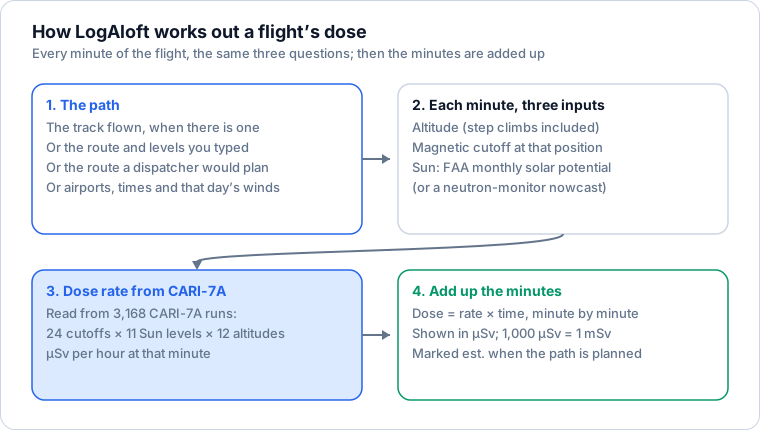
- The model is CARI-7A (version 4.2.0), developed by the FAA's Civil Aerospace Medical Institute. It follows galactic cosmic rays as the Sun modulates them, as Earth's magnetic field sorts them, and as they shower down through the atmosphere. It's the model the FAA's own guidance refers to.
- A precomputed grid. CARI-7A was run ahead of time at 3,168 points: 24 levels of magnetic cutoff, 11 levels of solar activity and 12 altitudes from 10,000 to 45,000 ft. Each minute of the flight reads its dose rate from that grid. Below 10,000 ft a low-altitude curve, also from CARI-7A, takes over. Checked against CARI-7A run directly, the grid agrees within 1.5% everywhere; against CARI-7A's own flight calculation on 82 flights, within 0.8%.
- The magnetic cutoff at each position comes from CARI-7A's own maps for 1965 to 2010, carried forward to the flight's date (the field drifts slowly).
- The Sun's activity is the FAA's published monthly value (the heliocentric potential). For months the FAA hasn't published yet, LogAloft uses a nowcast from the Oulu neutron monitor, accurate to about 1% in dose.
- Effective dose, ICRP 103 weighting, in microsieverts. That's the quantity the EU directive and the FAA use.
- No aircraft shielding. The fuselage lowers the dose slightly, up to about 8%, so leaving it out errs a little on the high side.
Solar storms
The everyday number is galactic cosmic radiation. Solar storms are handled separately, because they're rare and much less certain.
- In Settings, under Radiation, Count solar and geomagnetic storms adds two things to each flight that flew through one: the extra dose from a solar radiation storm, from NASA's NAIRAS model, read every hour; and the effect of a geomagnetic storm (Kp 5 and up, from GFZ Potsdam), which weakens Earth's magnetic shield. The storm share is shown on its own line on the flight.
- Storm doses are good only to about ±50%. Models have differed by 30 to 50% on past events, and the aircraft measurements of the same storm disagree with each other.
- Whether or not you add them, the logbook warns you when NOAA reports or forecasts a solar radiation storm around a high-latitude flight in the next three days.
Accuracy and uncertainty
| What | How good | Why |
|---|---|---|
| A flown dose | About ±20% | The uncertainty of the model itself. Against six reference measurements made on board (Meier et al., 2018), LogAloft was within 5% on average and 10% at most |
| An estimate | Usually within 10–15% of the flown dose | The path is a prediction. On 20 long-haul flights in September 2026, the planned path alone gave a dose within 3% of the real track's on average; predicting the times and levels as well, within 9% |
| The storm share | About ±50% | Storm spectra and directions vary, and few storms were measured aboard aircraft |
| Totals over a year | Better than any single flight | Path errors tend to average out; the model's ±20% does not |
For comparison, EURADOS asks any aircrew dose code to agree with measurements within 30%, and Spain's nuclear regulator accepts results between 33% below and 50% above the real value. The method page has the measurements and the references.
Dose standards
The same CARI-7A calculation can be weighted three ways. In Settings → Radiation → Dose standard:
| Choice | What it is | Compared with ICRP 103 at cruise |
|---|---|---|
| ICRP 103 effective dose (the current standard) | The default, used by the EU and the FAA | — |
| ICRP 60 effective dose (older, still used by some airlines) | The 1990 weighting, which counts neutrons more | About 26–33% higher |
| H*(10) ambient dose equivalent (what dosimeters read) | What onboard instruments are calibrated to | About 4–17% higher |
Your record is always kept in ICRP 103; the other two are shown from it. If your airline's figures run about 30% above LogAloft's, it probably uses ICRP 60: switch to compare like with like.
Where to find your dose
On each flight
In the logbook list, each flight shows its dose in µSv, with est. after estimates. Open a flight and its Dose tab, Cosmic radiation:
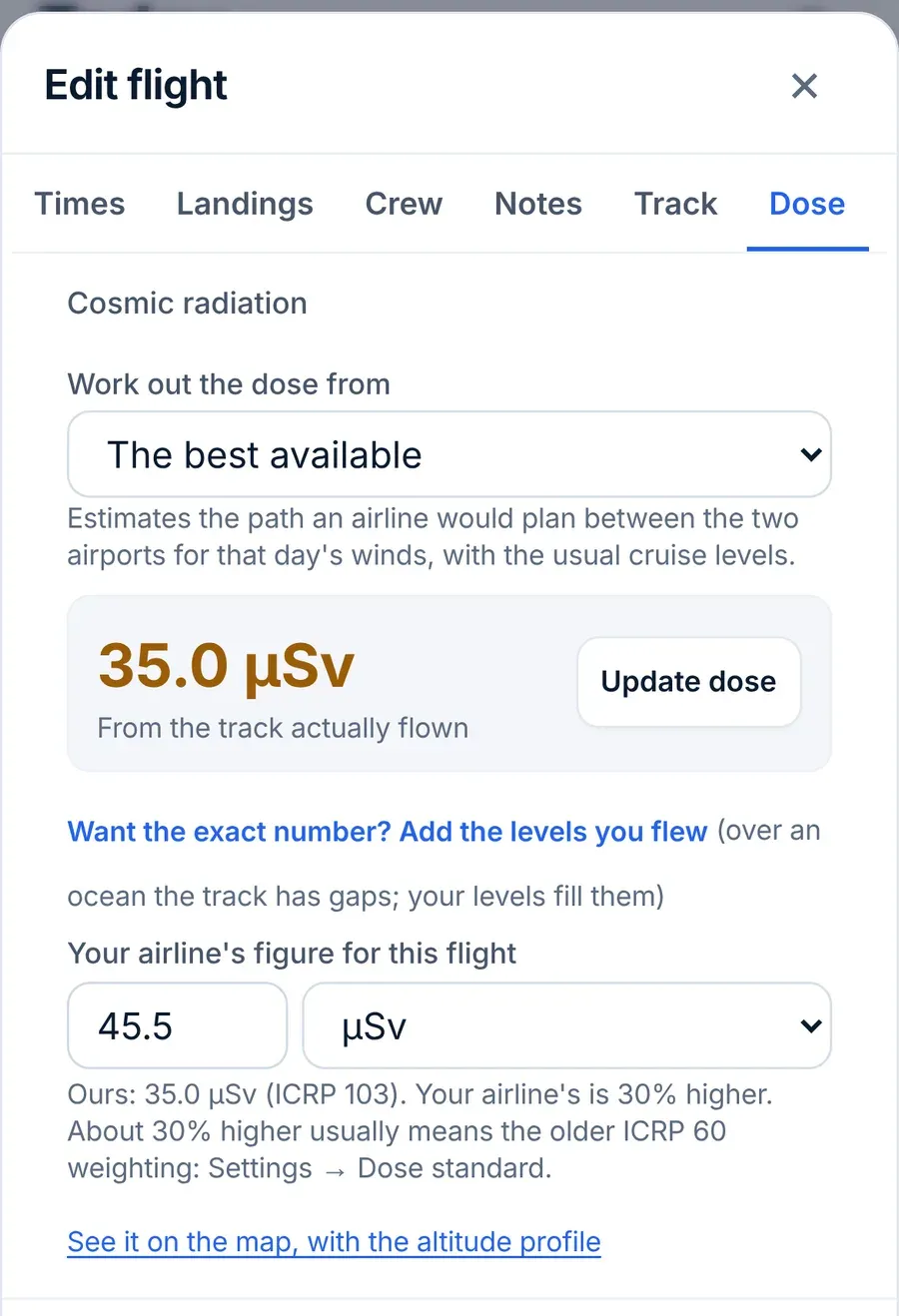
- Work out the dose from lets you pick the source: The best available (the default), The flight number (the track flown), The route and levels above, or The airports and the day's winds (estimate). Tap Update dose to work it out again (it reads Get dose on a flight that has none yet).
- Your airline's figure for this flight takes the number from your company's dose report, in µSv or mSv, and tells you how far apart the two are. About 30% higher usually means ICRP 60.
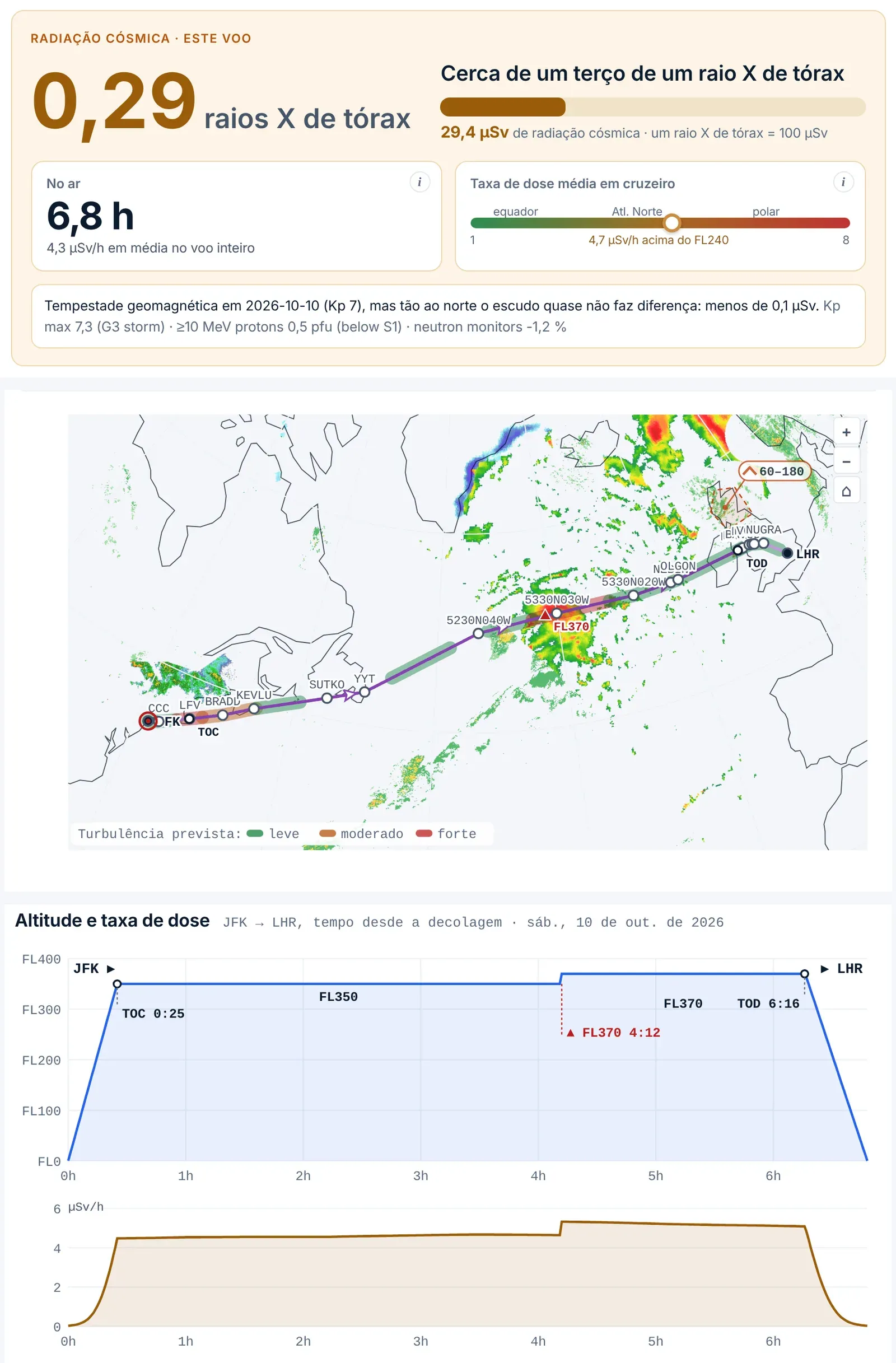
- See it on the map, with the altitude profile opens the flight on the lookup page, with the dose received along the route.
On Today and in the lists
On Today, your numbers include a Cosmic radiation tile: your dose for the last 12 months in mSv. On a computer it's a ring, with whether you're under or over 1 mSv (the limit for the public) and the next level up; on a phone it's a small tile on the third card. The next trip's card shows that trip's estimated dose, each day in the Trips calendar has a dot sized by its dose, and the Flights list shows each month's dose next to its hours, and the total for what's shown (all flights, a search or a smart group) under the search box.
In Reports
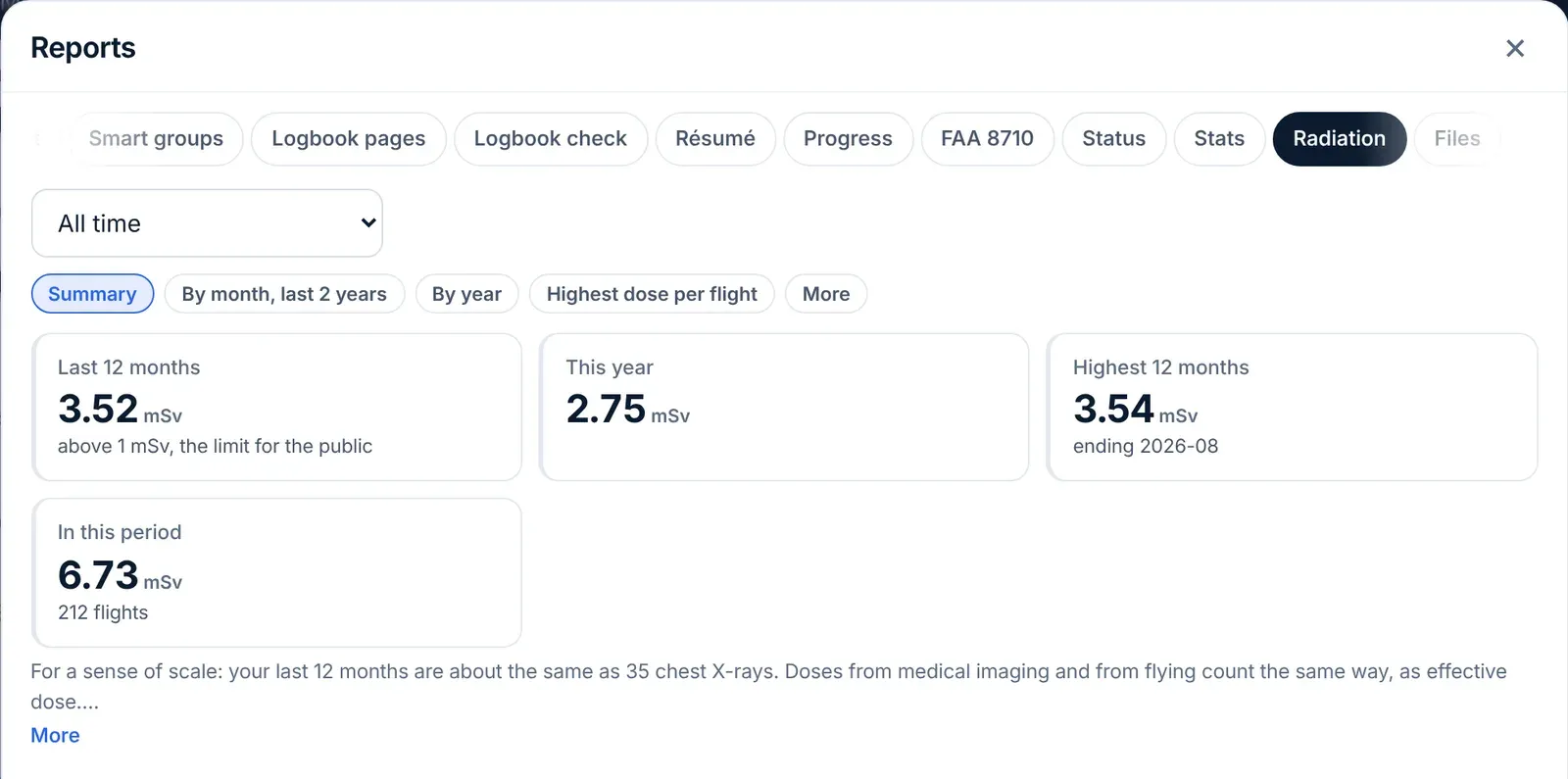
Reports → Radiation is your full record for any period you choose (All time, a recent window or Choose dates…). Under the period, a row of chips switches between its sections, one at a time: Summary, By month, last 2 years, By year, Highest dose per flight and More (on a large screen with room for everything, the chips may not appear and the sections follow one another).
- Summary: tiles for Last 12 months, This year, Highest 12 months and In this period, with how many flights still have no dose.
- By month, last 2 years, By year (flights, time aboard and dose), and Highest dose per flight by route, each under its own chip.
- Under More:
- Career: your total so far, A year at this pace, and a projection to the year in Flying until (year). If you set your date of birth and you're an airline pilot, it projects to your 65th birthday unless you type another year. It's a projection, not a prediction: it assumes every year is like the last 12 months.
- Health impact: your dose in chest X-rays, your average dose rate by route, how much time-zone change and early-morning flying your schedule involves, what the studies of crews have found, and what you can do. Each card has an ⓘ with the detail and its sources.
- Compare trips by dose (below).
- Print or PDF: radiation record.
If you don't want the tab, turn off Show the Radiation tab in Reports in Settings.
A record others can check
Print or PDF: radiation record prints your record for the period: totals, a table by year, and every flight with its dose and how it was worked out. When you're signed in, the printed record carries a 12-character code. Anyone you give it to can enter that code at logaloft.com/verify to see the period, flights, dose by year and the fingerprint LogAloft kept when the record was made. That shows the record wasn't changed after printing; it doesn't make it an official dose record.
Look up any flight on the home page
You don't need an account to see a flight's dose. On the home page, under My flight:
- Choose Flight number, type it (for example ZZ 412) and a date, and tap Get dose. Past dates use the track actually flown when one is available to you; future dates use the last time the flight flew.
- Or choose Airports, enter From, To and Date, and tap List flights to see every nonstop airline flight between the two that day. Pick one.
- Read the result: Cosmic radiation · this flight in µSv and in chest X-rays, Airborne time and Average dose rate at cruise. Below are Route map & profile (where along the route the dose was received, with the altitude and dose rate fix by fix) and Limits & additional cancer risk.
Route builder works out a route you paste (from a release, a flight plan or a planning app), a city pair with your own block time and levels, or a flown track you import from FlightAware or Flightradar24. An imported track stays on your device. Explore shows what a different level, latitude, solar cycle or frequency would do to the same route.
Planning around a pregnancy
- In Settings → Pregnancy and your own levels, turn on Track my dose during a pregnancy.
- In From, enter the day you declared it, or the start of the pregnancy.
- Leave the limits as they are (1 mSv for the rest of the pregnancy, from the EU and ICRP; 0.5 mSv in any month, from the FAA) or enter your own in For the pregnancy (mSv) and In any month (mSv).
- To see your dose since that date, open Reports → Radiation and set the period to Choose dates…, starting on that date. The In this period tile is your pregnancy total so far.
- Before a bid, use Compare trips by dose: with pregnancy tracking on, each trip shows how much of what's left of your limit it would use.
The date stays on your device only. It isn't stored in your account or its backups, so turn it on again on each device you use.
These numbers help you plan; they don't replace your airline's procedures or your doctor's advice. Tell your airline and your doctor early. LogAloft isn't a dosimeter and its record isn't an official one.
Compare trips before a bid
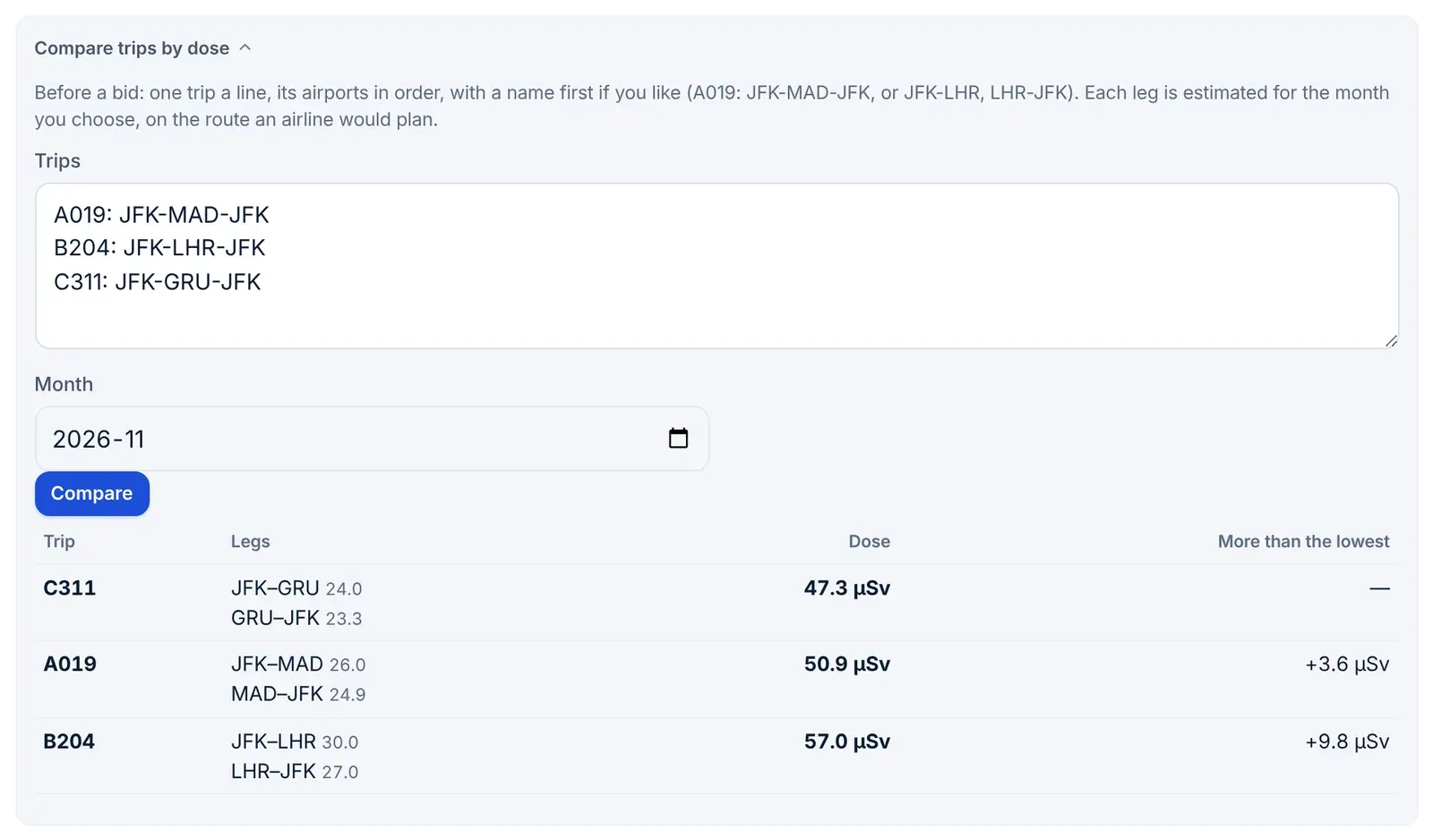
- Open Reports → Radiation, tap the More chip if the tab shows chips, and open Compare trips by dose.
- In Trips, type one trip a line: its airports in order, with a name first if you like. For example
A019: JFK-MAD-JFKorJFK-LHR, LHR-JFK. Up to 15 trips. - Set Month to the month you're bidding for and tap Compare.
- The trips come back lowest dose first, each leg with its own dose, the trip total, and how much more it is than the lowest.
Each leg is estimated for that month's solar activity, on the route an airline would plan. Use it to compare, not as a forecast of the exact dose.
Other ways to use the numbers
- Compare routes per hour. Health impact lists your routes by µSv per block hour and your average. It also tells you what the same hours would have come to at your lowest route's rate.
- Check your airline's report. Enter your company's figures on a few flights in Your airline's figure for this flight. A steady gap of about 30% points to ICRP 60; a gap that varies flight to flight points to different paths or levels.
- Keep levels for accuracy. On flights without a flown track, typing your actual cruise levels and step climbs is the single biggest improvement you can make to an estimate.
What it isn't
- Not dosimetry. Nothing is measured on your flight. It's a model calculation, the same kind airlines and authorities use.
- Not your official dose record. Where the law requires one (in the EU, for crew likely to exceed 1 mSv a year), it's your airline's. LogAloft's record is your own, unless your operator tells you it accepts it.
- Not medical advice. What a dose means for your health is a question for your doctor.
Common questions
Why did a flight's dose change after it landed?
The estimate was replaced by the dose along the track actually flown. Different levels, step climbs or a different oceanic track all change it. The list drops est. when that happens.
Why does an old flight still say est.?
Flown tracks are only fetched for the last 10 days. For older flights, type the route and levels if you have them, or add a track file.
My airline reports 30% more. Is LogAloft wrong?
Probably not. Set Dose standard to ICRP 60 and compare again.
Do the totals include solar storms?
Not unless you turn on Count solar and geomagnetic storms in Settings. Most flights never fly through one.
Does a simulator session count?
No. Simulator entries have no dose and aren't counted in any total.
Is a deadhead or commute counted?
Yes. Radiation doesn't care which seat you're in, so passenger legs in your logbook get a dose and count in your totals.
Why doesn't my pregnancy tracking show on my other phone?
The date is kept on each device only, for privacy. Turn it on again there.
Sources
- LogAloft method and validation: the model, grid, inputs, storm method and comparisons with measurements.
- CARI-7 and CARI-7A, FAA Civil Aerospace Medical Institute; Copeland K., CARI-7A: development and validation, Radiation Protection Dosimetry 175 (2017) 419–431.
- FAA Advisory Circular 120-61B, In-Flight Radiation Exposure: paragraph 7c (0.5 mSv a month to the conceptus).
- Council Directive 2013/59/Euratom, EUR-Lex: Articles 10(1) and 35(3).
- ICRP Publication 103 and Dose limits, ICRPaedia: effective dose and the pregnancy recommendation (paragraph 186).
- Meier M. M. et al., First steps toward the verification of models for the assessment of the radiation exposure at aviation altitudes, Space Weather (2018); EURADOS Report 2012-03, Comparison of codes assessing radiation exposure of aircraft crew.
- Mettler et al., Radiology 2008: 0.1 mSv for a two-view chest X-ray.