Help › Account and more
Fly the Dose: how to play
The game's modes, the three knobs, how to rotate and flare for a good grade, how stars, missions, streaks and ranks work, and strategy grounded in the real physics of cosmic radiation.
Fly the Dose at /play/ is now a one-control game: your airplane flies itself and you pick its cruise level among four, dodging storms, crossing traffic and ATC closures, for up to three stars against the autopilot's dose. This guide covers the classic 3D cockpit, still at /play/classic/ with Explore, the landing challenge and the weekly prize.
Fly the Dose is a game on a 3D globe: you fly a long-haul flight and try to take less cosmic radiation than the airline's usual plan without burning much more fuel. The dose rates come from the same CARI-7A model that works out the doses in your logbook, so what works in the game works for the same physical reasons in a real airplane. This guide covers every mode, the controls, how to get a good takeoff and landing grade, how scoring and the rewards work, and how to think about the trade-off. It's free and needs no account; signing in only matters for the weekly prize.
The modes
The tabs along the top choose the mode.
| Tab | What you do |
|---|---|
| Daily challenge | One flight, the same for everyone today, always in the A330. Beat the usual flight's dose. Counts for the daily streak, the boards and the weekly prize |
| Any route | Any two airports, or Surprise me. Choose the Sun: Sun today (today's real thunderstorm and turbulence SIGMETs, the jet stream from NOAA's GFS and any solar storm under way), Quiet Sun 2009 (the highest doses) or Active Sun 1991 |
| Free flight | Tap anywhere on the globe to put the airplane there and see the dose rate. Turn the altitude and switch the Sun |
| What if… | One route and what changes its dose: Cruise level, Route further north or south, The Sun and How often you fly it, against 1 mSv (the public limit) and 6 mSv (where the EU requires crew monitoring) |
| Landing | The landing challenge: the last 1,000 ft by hand in about 90 seconds, with its own daily board |
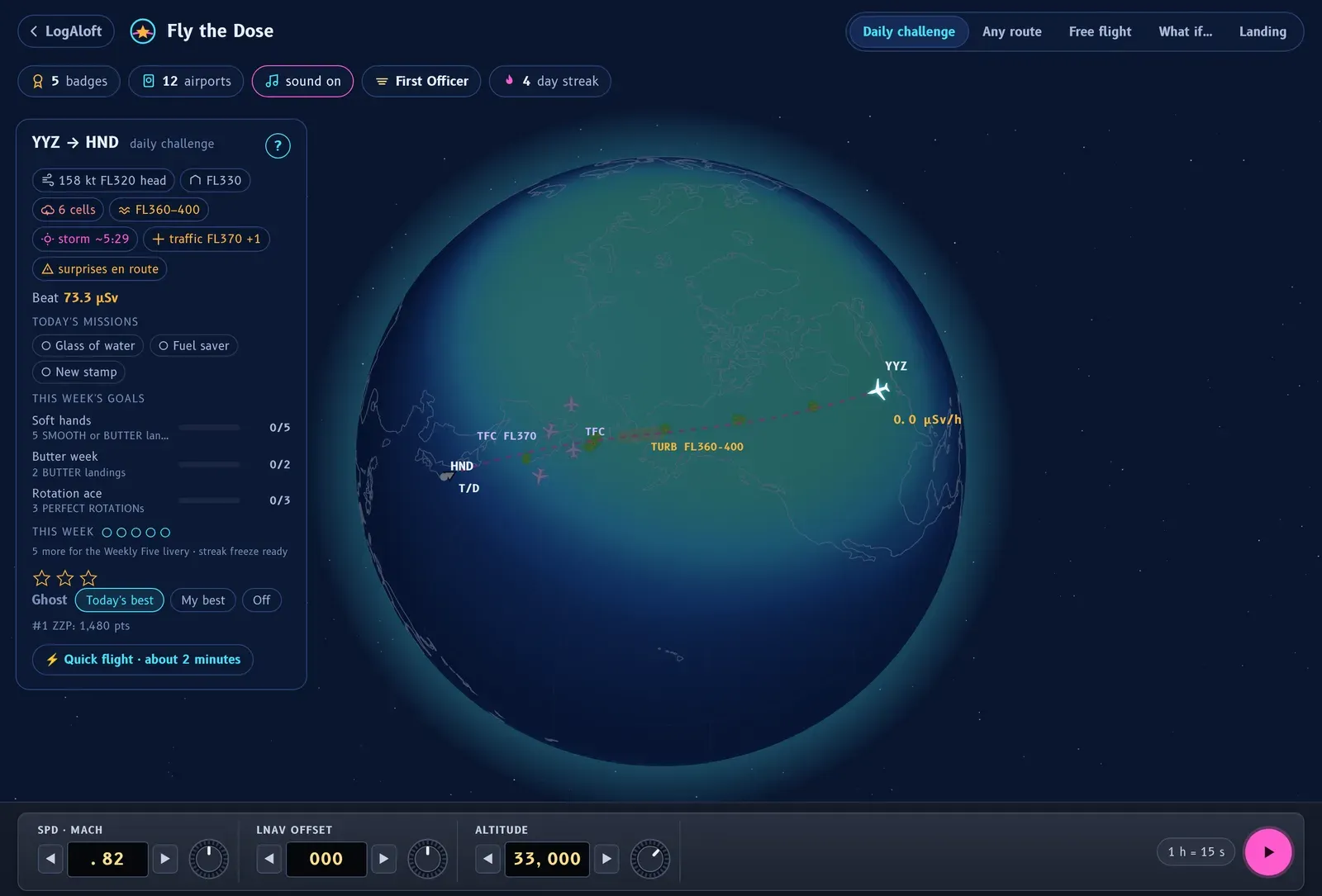
To start a flight, press the round pink ▶ button at the bottom right, beside the time-speed button (or Space). On the daily card you'll also find:
- ⚡ Quick flight · about 2 minutes: a short hop of 450 to 1,100 NM, hand-flown from 3,000 ft instead of 10,000. Good for one more flight.
- Fly your next trip: when the LogAloft logbook in the same browser has an upcoming flight, a button loads it with that day's weather and Sun, so you can see the dose you'll actually get.
- 🛬 Landing challenge · 90 seconds and ▶ Watch the computer fly it (a demo of the day's flight). These two show only when the card is open: tap ▾ beside the title (Flight details). On a computer the card starts closed, so you won't see them at first; the Landing tab at the top gets you to the landing challenge too.
The goal
Each flight has a usual flight: the airline's plan, at its usual levels and speed. The card tells you its dose, for example "Beat 35.4 µSv". You win by taking less radiation than that while keeping the fuel close to plan and the cabin comfortable. Read the briefing on the card before you go: the airplane's weight and best starting level, the jet stream and whether it's behind you or on the nose, thunderstorms, turbulence and any solar radiation storm.
The controls
Three knobs on the panel do the flying in the cruise. Turn one by dragging it up or down, or tap the arrows beside its window.
| Knob | Range | What it does | Keys |
|---|---|---|---|
| ALTITUDE | FL100 to the airplane's ceiling (FL410 in the A330), in 1,000 ft steps | Lower means less radiation but more fuel | ↓ or S climbs, ↑ or W descends (pull and push, like a yoke) |
| LNAV OFFSET | Up to 300 NM left or right, in 25 NM steps | A parallel track, to go around storms or away from the poles | ← → |
| SPD · MACH | Mach .78 to .86 | Faster means fewer hours aloft (less dose) but more fuel; slower saves a little fuel up to Mach .83 | + − |
Other keys: Space flies or pauses, D arms the descent (DES), and C centers the view on the airplane. The button beside the play button sets how fast time runs, from 1 h = 24 s to 1 h = 6 s.
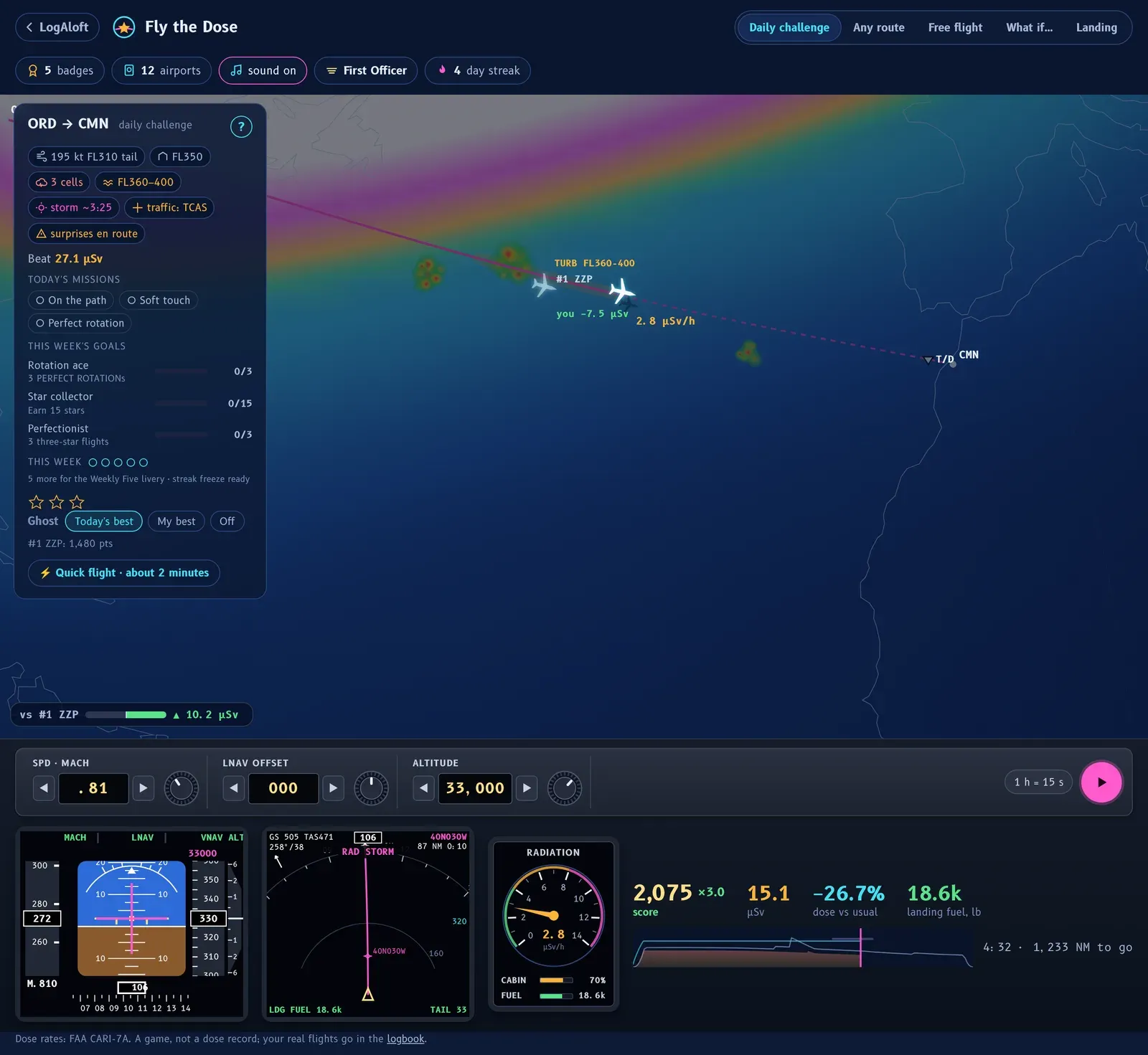
The instruments show the navigation display (ND) with the weather, the PFD, a RADIATION gauge, CABIN comfort and FUEL against plan, and your dose against the usual flight.
How to take off
The takeoff is flown from the cockpit, in real time, with two buttons: PULL (nose up) and PUSH (nose down).
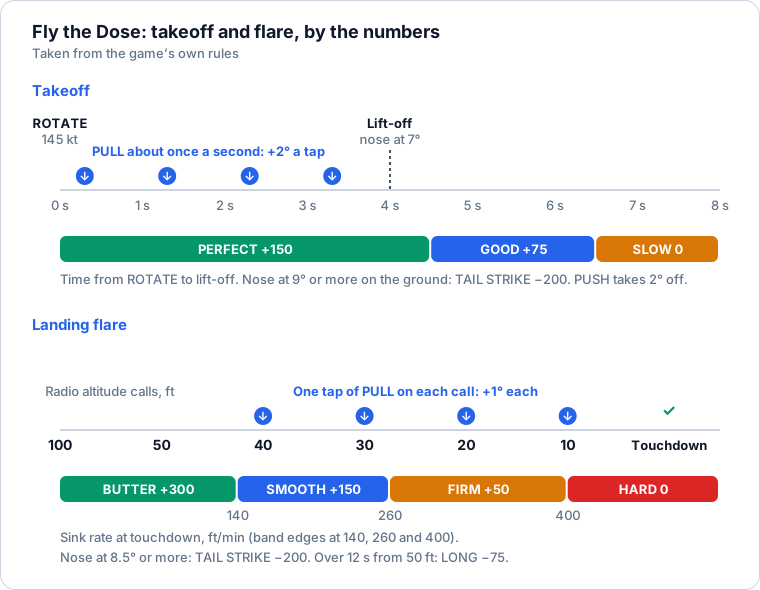
- Wait for the ROTATE call at 145 kt. Taps before it do nothing.
- Tap PULL about once a second, with the beat of the pulsing button. Each tap raises the nose 2°. Three or four taps bring it to 7°, and the wheels leave half a second later.
- Don't rush. Faster than about two taps a second rotates too fast: with the nose at 9° or more on the ground, you scrape the tail. The hint line warns you (SLOWER · about one tap a second). If you overdo it, tap PUSH to take 2° back off.
- If you don't tap at all, the airplane rotates by itself at the end of the runway, late.
On a keyboard, ↓, S or Space is PULL, and ↑ or W is PUSH. The takeoff is graded on the time from ROTATE to lift-off:
| Grade | Time from ROTATE to lift-off | Points |
|---|---|---|
| PERFECT ROTATION | 4.5 seconds or less | +150 |
| GOOD ROTATION | Up to 6.5 seconds | +75 |
| SLOW ROTATION | Longer | 0 |
| TAIL STRIKE | Nose at 9° or more on the ground | −200 |
The scoring follows real technique, where the rotation is smooth at about 2 to 3 degrees a second and lift-off comes a few seconds after the nose starts up. After lift-off the airplane climbs on the flight director to 1,000 ft, then accelerates and cleans up on its own, and the view moves outside.
The cruise
The autopilot climbs you to the level you've set. From then on the flight is yours to manage with the knobs.
- Points come in while your dose rate is below the usual flight's at the same point of the route: 200 points for every µSv you don't take. Stay below it and a dodge streak builds a multiplier, up to ×3 after 90 minutes of flight time.
- Thunderstorm cells cost points and cabin comfort; turbulence costs a little of both. WX AHEAD warns you of a cell near your level. Skirting a cell within 30 NM of its edge without going in is a CLOSE CALL +150.
- Decision cards. About every 45 seconds, when there's a real choice to make, a card offers two options and shows what each costs in dose and fuel: radiation rising, fuel or dose, the jet stream, a storm cell or turbulence ahead. Time slows to a quarter while it's up; if you don't answer in 12 seconds, nothing changes.
- A sick passenger (PAX UNWELL · SMOOTH RIDE): keep out of turbulence and storms for the next hour of flight time and you earn CARE +200.
- TCAS resolution advisory. When one sounds, PUSH and PULL light up as DESCEND and CLIMB and the right one pulses red. One tap moves your altitude 2,000 ft away from the traffic. Ignore it and the flight ends.
- The race. A bar shows your dose so far against the ghost's (or the usual flight's) at the same point, so you know in real time whether you're winning.
- Fuel. The tanks hold the usual flight's fuel plus contingency and reserves, so the usual settings always land with the planned fuel. If the extra fuel you burn would leave less than 8,000 lb at landing, you divert, and a diverted flight earns no stars.
For your first three flights, a coach gives short tips at the right moments, such as at the top of climb: lower means less radiation and more fuel.
The descent and approach
The descent starts by itself at the top of descent. Arm it yourself with DES (or D) before then and you get ON THE PATH +100.
From 10,000 ft (3,000 ft on a quick flight), the approach is hand-flown. PUSH and PULL hold the glide path; flaps and gear moving out push you off it. Down to 40 ft, a big diamond beside the buttons shows where the path is, with a word: ON PATH, HIGH · PUSH, LOW · PULL, TOO HIGH · PUSH or TOO LOW · PULL. Correct early, a tap or two at a time.
A go-around costs 400 points, some fuel, time and cabin comfort. It happens when you're more than two and a half dots off the path passing 1,000 ft (UNSTABLE), far too high close in, or too low short of the runway.
How to land: the flare
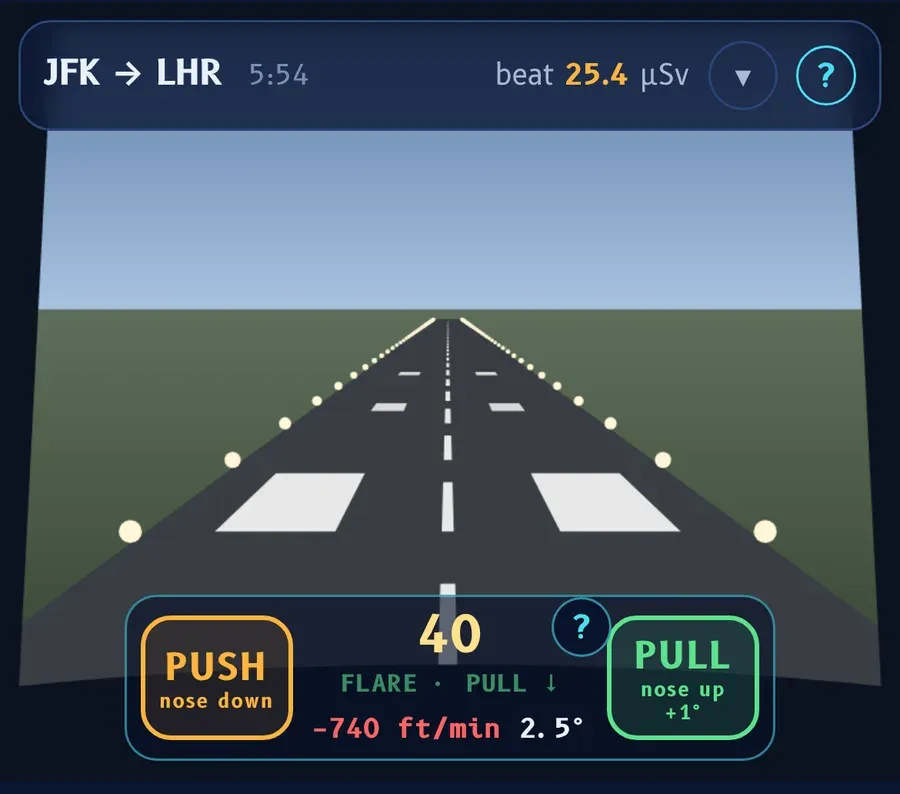
The last 100 ft are flown in real time, configured with full flaps and the gear down, at about 740 ft a minute down the path.
- Keep the diamond centered on the approach.
- At 40 ft the diamond and its word give way to the call: the panel shows the radio altitude in big numbers and FLARE · PULL ↓ under it (then RETARD at 20 ft). Start the flare: one tap of PULL on each call, 40, 30, 20, 10. Each tap raises the nose 1°, which takes about 270 ft a minute off the sink. The nose settles back slowly unless you keep at it.
- Watch the sink rate. A gust can push it around, and there's usually one stronger gust somewhere between 60 and 25 ft. Ground effect cushions the last 25 ft, and at 20 ft the thrust comes back to idle.
- Don't over-flare. Too many taps float the airplane down the runway or strike the tail.
| Grade | Sink at touchdown | Points |
|---|---|---|
| BUTTER | Up to 140 ft/min | +300 |
| SMOOTH | Up to 260 ft/min | +150 |
| FIRM | Up to 400 ft/min | +50 |
| HARD | More than 400 ft/min | 0 |
| TAIL STRIKE | Nose at 8.5° or more | −200 |
| LONG | More than 12 seconds from 50 ft to touchdown | −75 more |
For your first five takeoffs and landings, a short card above the buttons (under them on a phone) reminds you how. The ? beside the call brings it back.
The landing challenge
The Landing tab is the approach and flare on their own: the last 1,000 ft in cloud, breaking out between 300 and 600 ft, with gear down. You start up to a dot high or low, the wind needs its own steady correction, it gusts, and one burst somewhere between 700 and 250 ft pushes you off the path. You score up to about 10 points a second for staying on the path, and the flare grade counts double. More than two dots off at 300 ft is a go-around. Everyone gets the same wind on the same day; use Practice to warm up and Fly today's for the board.
Stars and scoring
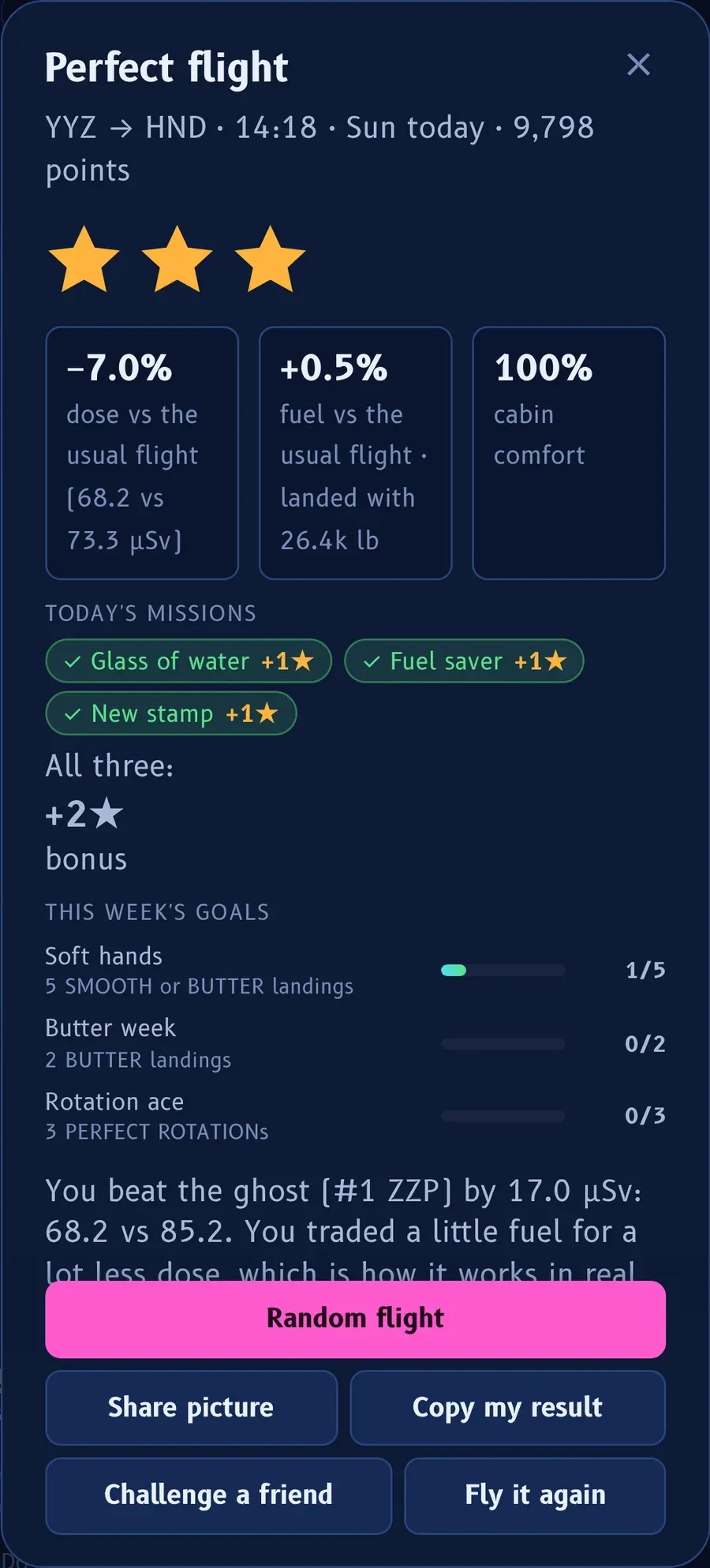
At the end of a daily or route flight you get up to three stars, from three numbers compared with the usual flight: the dose you saved, the extra fuel you burned, and the cabin comfort at landing.
| Stars | Dose | Fuel | Cabin |
|---|---|---|---|
| ★★★ | 5% less or better | +2% at most | 80% or more |
| ★★ | 2% less or better | +3% at most | 60% or more |
| ★ | Anything else |
Two exceptions: with more than 4% extra fuel, you get one star only if your dose is no higher than the usual flight's, and none if it is; and a diverted flight gets none. The result tells you exactly what the next star needed, for example "So close: 1.8% less dose for ★★★".
Just before the result, you see a replay of your touchdown from beside the runway; the landing grade (BUTTER, SMOOTH and so on) pops up at touchdown and isn't repeated on the result screen. The result screen has a big pink Random flight button (a new Any route flight), then Share picture, Copy my result, Challenge a friend and Fly it again.
Missions, goals and streaks
Today's missions
Every day brings three missions, drawn from sixteen and the same for everyone. They count on any daily or route flight. Each earns +1★ the first time that day; all three earn +2★ more and the Mission control badge.
| Mission | To do |
|---|---|
| Perfect rotation | PERFECT ROTATION on the takeoff |
| Soft touch | Land SMOOTH or BUTTER |
| Butter | A BUTTER landing |
| Both ends | PERFECT ROTATION and a SMOOTH or BUTTER landing |
| Stable approach | Land with no go-around |
| On the path | Arm DES before the top of descent |
| Dry run | No storm cell entered |
| Dose −5% | 5% less dose than the usual flight |
| Dose −10% | 10% less dose than the usual flight |
| Fuel saver | Fuel no more than +1% |
| No extra fuel | Fuel at or under the usual flight |
| Smooth ride | Cabin comfort 90% or more |
| Glass of water | Cabin comfort 100% |
| Three stars | A three-star flight |
| Long haul | A three-star flight of 7 hours or more |
| New stamp | Fly to or from an airport not yet in your passport |
The week's goals
Each week, Monday to Sunday, brings three goals drawn from eight, again the same for everyone, with progress bars that carry over from flight to flight: fly 8 flights, 5 SMOOTH or BUTTER landings, 2 BUTTER landings, earn 15 stars, 4 new airports, 3 three-star flights, 3 PERFECT ROTATIONs, or save 25 µSv in all against the usual flights. Each one done earns +3★; all three earn +5★ more and the Week done badge.
Streaks
- The daily streak counts daily challenges flown on consecutive days. One streak freeze a week covers one missed day by itself; you'll see "Streak saved" when it does. Five dailies in one week earn the Weekly Five badge and livery.
- The soft-landing streak counts SMOOTH or BUTTER landings in a row, with your best kept. Anything firmer starts it again. Five in a row earns the Five in a row badge.
Badges, ranks, airplanes and liveries
Badges. Twenty-one, from easy (First flight) to rare (Quiet Sun, Ceiling at FL450). Others include Polar bear (north of 75°N or south of 75°S), Equator line, Low and slow (a whole flight of over 2 hours below FL300), Hot spot (10 µSv an hour or more), One X-ray (a single flight of 100 µSv or more), Speed run, Weaver, Side step, Dose dodger (three stars on a daily), Globetrotter and Rival. The Passport stamps every airport you fly to or from.
Ranks follow your total stars:
| Rank | Stars |
|---|---|
| Cadet | 0 |
| Second Officer | 5 |
| First Officer | 15 |
| Captain | 35 |
| Senior Captain | 70 |
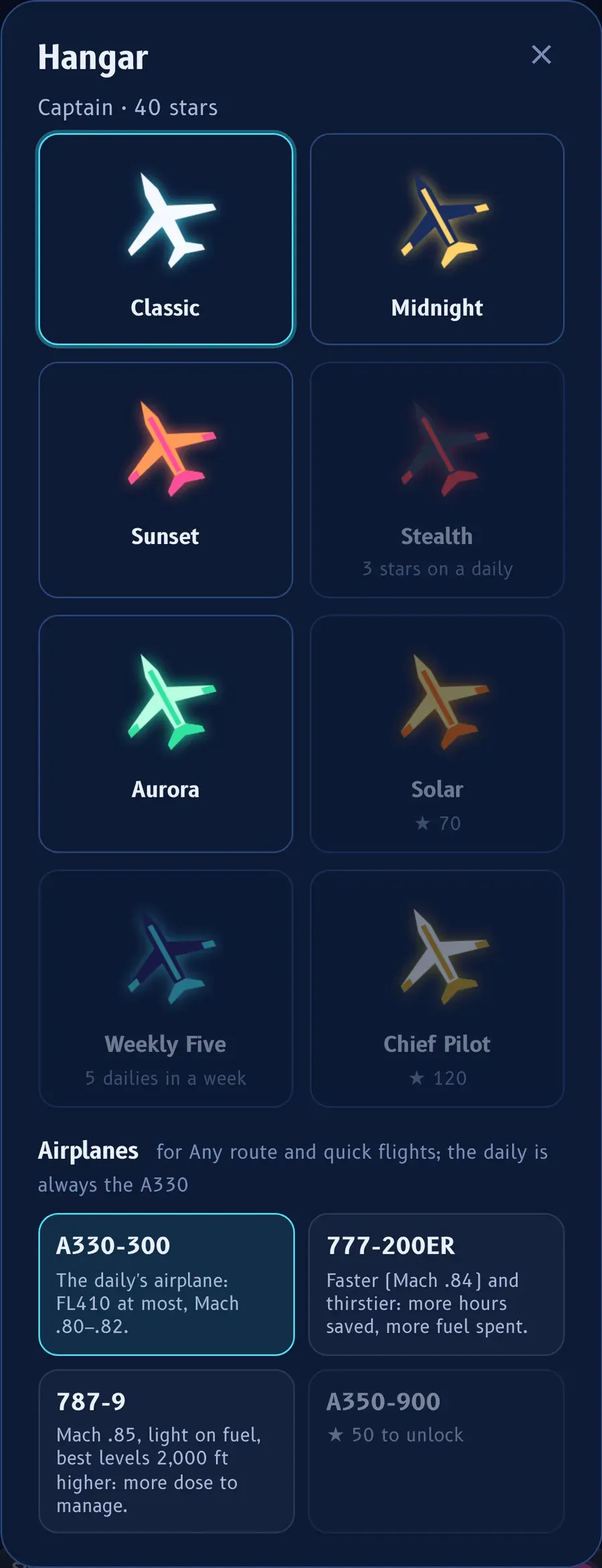
| Chief Pilot | 120 |
The hangar. Tap your rank to open it. Airplanes unlock with stars: the A330-300 from the start, the 777-200ER at 15 (faster and thirstier), the 787-9 at 30 and the A350-900 at 50 (both Mach .85, with best levels 2,000 ft higher, so more dose to save by going lower). They fly Any route and quick flights; the daily is always the A330, so everyone flies the same airplane. Liveries, all made-up paint schemes, unlock the same way: Midnight at 5 stars, Sunset at 15, Aurora at 35, Solar at 70 and Chief Pilot at 120; Stealth comes with the Dose dodger badge and Weekly Five with the Weekly Five badge.
The ghost, friends and leagues
- The ghost. On the daily card, Ghost chooses who flies beside you: Today's best (the day's best checked flight), My best, or Off. Its label shows the dose gap as you go.
- Challenge a friend. On the result, Challenge a friend copies a link with your route and your flight. Your friend flies the same flight with your ghost beside them. Beating a friend's challenge earns the Rival badge. There's no challenge link for a diverted flight.
- Crew leagues. The boards can be narrowed to your airline, your base and your fleet, taken from your logbook settings or typed in. invite your crew shares a link that puts a crewmate in the same league (for example
/play/?league=ZZ-BOS-A330). - The weekly prize. Two weeks of LogAloft Pro for first place, one week for second and third. To place you need three daily challenges with at least two stars in the week, signed in. Every result is checked by the server, which flies your inputs again. Standings and the rules are linked on the daily card.
Your stars, badges, streak and liveries are kept in this browser on this device. They don't follow you to another phone or computer, and clearing the browser's data for the site removes them.
Strategy: the real physics
The game uses the same physics as your logbook, so the levers are the real ones. Cosmic radiation for aircrew explains them in depth.
- Lower is the biggest lever, and it costs fuel. At cruise, each 1,000 ft lower takes roughly 6% off the dose rate near the poles. But below the best level the engines burn more, so a big descent early in a heavy airplane can cost you a star on fuel. Try 2,000 ft below the plan, not 8,000.
- Away from the poles matters most on northern routes. Above about 55–60° geomagnetic latitude the magnetic field gives almost no protection, and the dose rate is two to four times the equator's at the same level. On a North Atlantic or polar route, an offset toward the south can pay; on a route that's already at low latitude, it buys almost nothing and costs fuel.
- Use the wind. An offset that puts you in the jet stream core going east can save both fuel and time. Going west, stay out of it. The briefing tells you where the core is.
- Speed is a small lever. Faster cuts the hours aloft, and the dose in proportion, but the fuel goes up quickly above the usual Mach.
- Watch for solar storms. When SOLAR STORM appears, the dose rate rises most at high latitudes. That's when going lower and farther from the pole pays the most, as it does for real.
- Listen to the FMS. When you sit well below the best level, a call such as FMS: OPT FL370 · +3% FUEL tells you what it's costing. The best level rises as the airplane gets lighter.
- Fuel is the referee. The three-star line is +2% fuel. Keep an eye on the fuel number and spend your extra fuel where the dose is highest, usually the high-latitude middle of the flight.
- Bank the easy points. A PERFECT ROTATION, DES armed before the top of descent and a SMOOTH landing are worth more than many minutes of cruise. They also complete missions.
It's a game, not a dose record. Your real flights belong in the logbook, where each dose is worked out from the path actually flown. In a real airplane, level and route changes belong to the captain, dispatch and ATC.
Common questions
Do I need an account to play?
No. You need to be signed in only to place for the weekly prize.
Why can't I climb above FL410?
The daily is always flown in the A330, whose ceiling is FL410. Unlock the 777, 787 or A350 for higher levels on Any route, or use Free flight.
I tapped PULL and nothing happened.
You tapped before ROTATE. Taps before 145 kt don't count.
Why did I get a TAIL STRIKE?
You tapped faster than about two taps a second, so the nose passed 9° while still on the runway. Keep to one tap a second, and use PUSH to take 2° off.
Why did my landing float and come out LONG?
Too many PULL taps held the airplane off. One tap per call from 40 ft is usually enough.
My streak broke even though I missed only one day.
The freeze covers one missed day a week. A second missed day in the same week, or two days in a row, breaks the streak.
My stars disappeared on my new phone.
Progress is kept in the browser on each device. It doesn't move between devices.
Sources
- Fly the Dose: the game's rules, as written in its own help (? on each mode) and code.
- CARI-7 and CARI-7A, FAA Civil Aerospace Medical Institute: the dose rates in the game.
- LogAloft method and validation: how the same model works out logbook doses.
- FAA Advisory Circular 120-61B, In-Flight Radiation Exposure: the factors that set the dose (paragraph 9b) and the polar-to-equator ratio (paragraph 6a).
- Council Directive 2013/59/Euratom, EUR-Lex, Article 35(3): the 6 mSv a year figure in What if….